Best AI Tools for PhD Students and Researchers in 2026
Compare the best AI tools for PhD research in 2026 by task: paper search, summarization, synthesis, academic writing, and citation management.
The best AI tools for PhD students remove a specific bottleneck while keeping the evidence trail intact. For most PhD research, use separate tools for discovery, reading and synthesis, drafting, and citations; no general chatbot should become your paper database or final authority on what a study says.
Quick answer: three practical PhD stacks
Choose the smallest stack that matches the work in front of you.
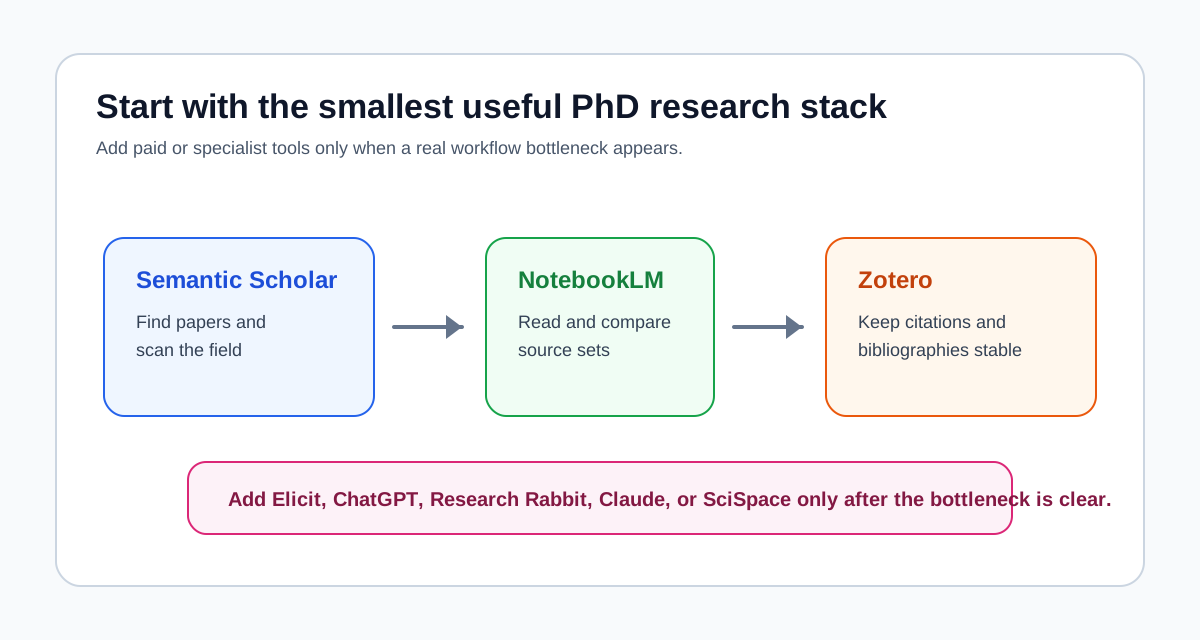
Free starter stack
- Semantic Scholar for broad academic search and alerts
- NotebookLM Standard for working across a selected source set
- Zotero for collecting sources, notes, citations, and bibliographies
This is the best default for a new PhD student because the core products are available without a subscription. It covers discovery, source-grounded reading, and reference management before you add another AI assistant.
Literature review stack
- Elicit for question-led paper discovery, screening support, and structured extraction
- Zotero for the durable reference library
- NotebookLM for comparing the full texts you have selected
Use this stack when your review has a defined question and inclusion logic. Elicit has a free Basic plan, but its dedicated systematic-review capacity and heavier workflows sit on paid tiers. NotebookLM can now discover web sources, but a formal review still needs a documented search strategy and human screening.
Academic writing stack
- NotebookLM for evidence notes tied to the source set
- ChatGPT or Claude for outlining, restructuring, and language revision
- Zotero for inserting and checking citations
Use a drafting assistant only after the evidence notes exist. ChatGPT and Claude both have free plans with limits, but neither should be treated as the source of a quotation, result, or bibliographic record.
If you already have papers, the next decision is usually whether you need source-grounded analysis or flexible drafting. Our comparison of NotebookLM vs ChatGPT for research explains that handoff. If you do not have a reliable source set yet, solve discovery first.
Best AI tools for PhD students at a glance
| Current bottleneck | Primary pick | Useful alternative | What still needs human checking |
|---|---|---|---|
| Finding an initial paper set | Semantic Scholar | Elicit | Search coverage, query design, and missed databases |
| Screening a structured review | Elicit | SciSpace or Paperguide | Inclusion criteria, exclusions, and audit trail |
| Understanding one difficult paper | SciSpace | NotebookLM | Methods, statistics, and the original wording |
| Comparing several selected papers | NotebookLM | Paperguide | Whether each synthesis claim is supported by the cited sources |
| Exploring a citation neighborhood | ResearchRabbit | Connected Papers | Whether recommendations are complete or merely adjacent |
| Outlining and revising a chapter | ChatGPT | Claude | Argument, originality, policy compliance, and every factual claim |
| Managing references and citations | Zotero | Paperpile | Metadata, page numbers, retractions, and final citation style |
The table is a decision map, not a ranking from first to last. Elicit and Semantic Scholar can both discover papers, for example, but Elicit is more useful when the search must feed structured screening or extraction. Semantic Scholar is the simpler free starting point for broad discovery.
Choose by PhD milestone, not by brand
The same researcher may need a different stack at the proposal, literature-review, and writing stages. Buying an all-in-one tool early does not remove the need to move evidence between those stages.
Proposal and topic-scoping stage
Start with Semantic Scholar when you need to learn the vocabulary of a field, identify important papers, and follow authors or topics. It is free and designed for scientific-literature discovery.
Add Consensus when your first question is closer to “What does the research broadly say about this claim?” Its free plan supports paper searches, while higher-effort summaries and deep reviews have usage limits. Consensus is useful for orientation, but the resulting overview is not a substitute for your own reproducible search.
The output of this stage should be a better question and a seed library, not a polished literature-review paragraph.
Formal literature-review stage
Choose Elicit when you have a defined research question and need search results to move into screening, data extraction, or a systematic-review workflow. Its current Basic plan supports free search and paper summaries; exporting tables and running review workflows at scale depends on the plan and workflow.
Choose SciSpace when the bottleneck is moving between paper discovery, table-based comparison, and close reading in one interface. Its Literature Review and Chat with PDF tools support filtering, summaries, extraction, and citation export, but AI-generated interpretations still need to be checked against the paper.
Choose Paperguide when you want a more integrated research workspace that combines search, PDF chat, extraction tables, reference management, and writing. It has a free tier with monthly limits, while systematic-review capacity is reserved for paid tiers.
For a narrower comparison of discovery tools, read Elicit vs Consensus: Which AI Research Search Tool Fits?. For the boundary between finding papers and working with a selected source set, see Elicit vs NotebookLM for discovery and synthesis.
Reading and paper-summarization stage
Use SciSpace when one difficult article is slowing you down. Highlighting a dense passage and asking for an explanation can help you locate the part that deserves closer reading. Do not rely on the explanation for a methods or results claim without returning to the PDF.
Use NotebookLM when the task changes from “What does this paper say?” to “Where do these papers agree, conflict, or use different definitions?” NotebookLM supports PDFs, Word files, web pages, Google Drive files, and other source types. Its responses are grounded in the selected notebook sources and can include citations back to them.
NotebookLM now also includes Fast Research and Deep Research for finding web sources. That makes it more useful at the start of a project than it used to be, but it does not turn a web search into an exhaustive scholarly search. Treat discovered sources as candidates to evaluate and store, not as a complete corpus.
If paper summarization is your main problem, use this rule:
- One paper, difficult passage: start with SciSpace.
- Several papers, themes and disagreements: start with NotebookLM.
- Structured screening and extraction: start with Elicit or another review-specific workflow.
For a worked source-grounded process, read How to Use NotebookLM for Literature Review.
Academic writing and revision stage
Use ChatGPT after you have verified notes. It is useful for building an outline, testing section order, identifying missing transitions, shortening a paragraph, or turning rough notes into a first draft that you will review.
Use Claude as an alternative when you want to work with a larger draft or keep more contextual material in one revision session. Claude's free plan has usage limits; paid plans increase capacity and add research and project features.
The important boundary is the same for both products: the drafting assistant can propose language, but it cannot take responsibility for the argument. OpenAI's own guidance warns that ChatGPT can fabricate quotations, studies, and citations. Never paste an AI-generated reference directly into a dissertation. Locate the source, read it, save the correct record to Zotero, and cite from there.
Citation-management stage
Use Zotero unless you have a clear reason to choose something else. Zotero is free and open source, stores a local library, supports Word, LibreOffice, and Google Docs, and can generate citations and bibliographies through its word-processor integrations.
Use Paperpile when a browser-centered workflow, Google Docs collaboration, or its interface is worth an ongoing subscription to you. Paperpile currently offers a 30-day trial rather than a permanent free plan and supports Word, Google Docs, BibTeX, browser capture, and reference-library management.
A reference manager reduces formatting work; it does not guarantee correct metadata. Before submission, check author names, title, journal, year, DOI, page range, and the locator used for any direct quotation.
A practical PhD workflow from question to cited draft
This sequence keeps discovery, evidence, and prose separate enough to audit.
1. Write the research question and search logic
Define the concepts, likely synonyms, date range, and initial inclusion boundaries before asking an AI system to find papers. For a formal review, record the databases, queries, filters, and search dates.
2. Build a candidate paper set
Search a scholarly database appropriate to your field. Use Semantic Scholar, Elicit, Consensus, or another tool as a discovery layer, but do not assume any one index covers everything relevant.
3. Save candidates to Zotero
Create a collection for the project, correct obvious metadata errors, attach available full text, and remove duplicates. This library becomes the stable handoff between discovery and reading.
4. Screen with explicit criteria
Use AI-generated summaries or extraction columns to accelerate triage, not to hide the decision. Record why a paper was included or excluded, and manually inspect borderline cases and every paper that materially affects the conclusion.
5. Read the decisive papers in full
Use SciSpace or NotebookLM to ask targeted questions about methods, samples, definitions, limitations, and results. Then open the original passage before moving the claim into your notes.
6. Build an evidence matrix before drafting
Compare sources by question, method, population, finding, limitation, and relevance to your argument. NotebookLM can help locate agreements and contradictions across the selected set, while a spreadsheet or structured note keeps the final evidence map inspectable.
7. Draft from verified notes and cite from the library
Use ChatGPT or Claude to test an outline or revise language. Insert citations through Zotero or Paperpile rather than asking the chatbot to generate a bibliography. Finish with a claim-by-claim check against the original papers.
For a more detailed handoff, see How to Use Zotero with NotebookLM. The broader AI research workflow guide covers each stage in more depth.
Specialist tools: add them only for a named gap
| Tool | Add it when | Do not add it just because |
|---|---|---|
| Consensus | You need a fast, research-grounded orientation to a question | You want to avoid building a defensible search strategy |
| SciSpace | Dense individual papers or table-based review work are slowing you down | You already read and compare papers effectively elsewhere |
| Paperguide | You prefer an integrated search, review, reference, and writing workspace | “All in one” sounds simpler before you test the handoffs |
| ResearchRabbit | You want ongoing citation-network discovery and alerts | You expect a visual network to prove search completeness |
| Connected Papers | You have a strong seed paper and want a quick similarity graph | You need unlimited exploration on the free plan, which currently allows five graphs per month |
| Paperpile | Its browser and writing integrations justify a subscription | You have not yet tested the free Zotero workflow |
ResearchRabbit now has both a free tier and RR+. The free tier includes citation browsing, collections, Zotero import, BibTeX import and export, and searches that can start from up to 50 seed articles. RR+ adds larger-scale and advanced controls. This makes the free tier a reasonable addition when citation-network discovery is a recurring problem, but it is no longer accurate to describe every part of the product as entirely free.
What AI should not do in a PhD workflow
Do not let generated citations enter the thesis unchecked
A plausible title or DOI is not evidence that a source exists. Verify every record in the publisher page, database record, or full text, and insert the final citation from your reference manager.
Do not outsource inclusion decisions without an audit trail
AI can prioritize or extract information from candidates, but a defensible review needs explicit criteria and inspectable decisions. If the review affects a publication, protocol, clinical conclusion, or policy recommendation, evaluate the workflow against manual screening rather than assuming the tool is accurate.
Do not upload confidential material before checking policy
Before uploading unpublished manuscripts, interview transcripts, participant data, peer-review material, or lab documents, check your institution's rules, consent terms, journal policy, and the product's current data controls. A consumer free plan and an institution-approved workspace may not have the same protections.
Do not confuse a fluent summary with critical reading
Use AI to identify passages and questions worth examining. Read the original methods, results, limitations, and decisive citations yourself. The goal is to reduce friction around judgment, not remove judgment from the process.
Final recommendation
For most PhD students, start with Semantic Scholar, NotebookLM, and Zotero. This covers discovery, source-grounded reading, and citations without requiring a paid subscription.
Add Elicit when the literature review becomes structured enough to need screening or extraction. Add ChatGPT or Claude when drafting and revision become the bottleneck. Add SciSpace, Paperguide, ResearchRabbit, Connected Papers, or Paperpile only when you can name the workflow problem and explain why your current stack does not solve it.
The best AI tool for PhD research is therefore not one product. It is the smallest source-aware workflow that preserves a path from every important claim back to the paper that supports it.
Common questions from PhD students
Choose tools by the evidence task, then keep a human verification step.
Related reading
- AI Research Workflow: Best Tool for Each Research Stage
- Elicit vs NotebookLM: Paper Discovery vs Source Synthesis
- Elicit vs Consensus: Which AI Research Search Tool Fits?
- Best AI Literature Review Tools
- NotebookLM vs ChatGPT for Research and Literature Review
- How to Use Zotero with NotebookLM
Sources and official references
Product features and plan descriptions below were checked against official pages on August 14, 2026. Limits and prices can change.
- Elicit pricing and plan comparison
- Elicit export documentation
- Semantic Scholar: About and product overview
- Consensus subscription plans
- NotebookLM supported sources and source discovery
- NotebookLM plans and usage limits
- SciSpace literature-review workflow
- Zotero quick-start guide
- Zotero: Why Zotero?
- Paperpile pricing and trial
- ResearchRabbit pricing
- ResearchRabbit free-tier guide
- Connected Papers pricing and free limits
- Paperguide pricing and plan comparison
- ChatGPT accuracy and fake-citation guidance
- ChatGPT pricing
- Claude pricing
- Claude usage and plan guidance
Request the AI research workflow checklist
A practical checklist for choosing when to use NotebookLM, ChatGPT, Elicit, Consensus, Perplexity, Google Scholar, and Zotero.
No hype. Just workflow-first research tool decisions.