AI Research Workflow: Best Tool for Each Research Stage
Choose the right AI research tool for discovery, reading, synthesis, drafting, and citations without forcing one assistant to do every job.
The biggest mistake in AI research work is trying to use one tool for everything. Research is not one task. It is a sequence of different tasks, and the tool that helps you find papers is often the wrong tool for reading them, synthesizing them, drafting from them, or citing them correctly.
That is why the most useful way to choose an AI tool in 2026 is by stage. If you assign each stage a clear job, your workflow gets faster and more reliable. If you expect one assistant to cover discovery, reading, synthesis, drafting, and references equally well, the workflow usually gets messier, not better.
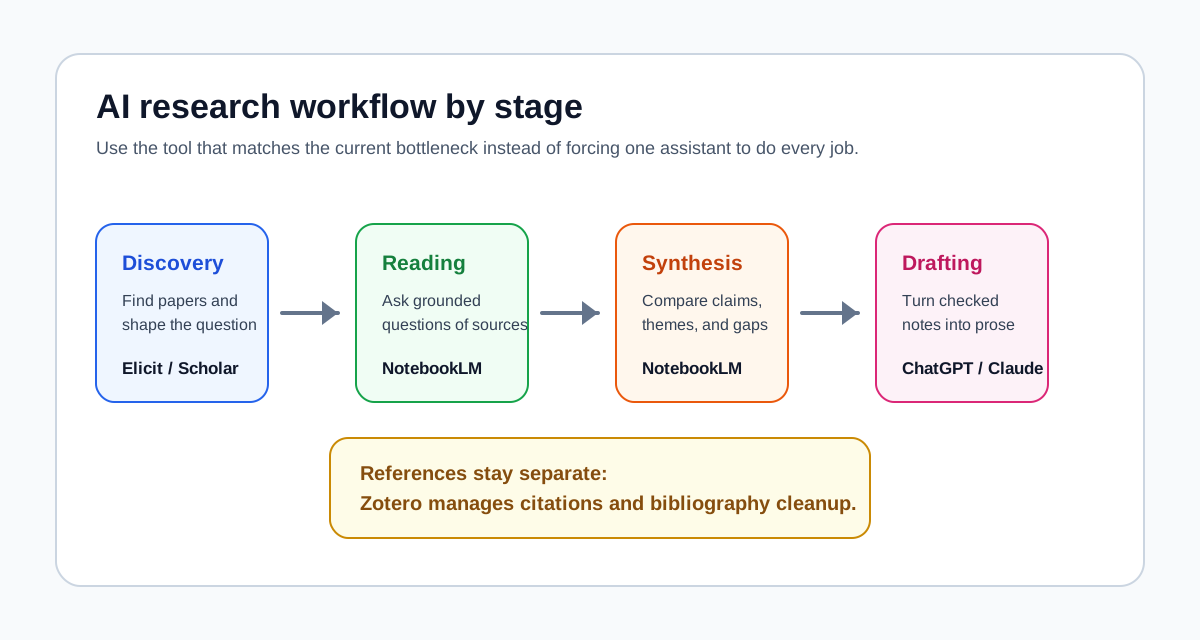
Discovery: Elicit or Perplexity. Paper search: Elicit, Semantic Scholar, or Consensus. Source reading: NotebookLM. Synthesis: NotebookLM or Gemini Notebooks. Drafting: ChatGPT or Claude. References: Zotero.
| Workflow stage | Best for | Not for | Use with |
|---|---|---|---|
| Elicit / Scholar | Building the paper set | Drafting or source synthesis | Consensus for fast evidence checks |
| NotebookLM | Reading and comparing selected sources | Finding every paper from scratch | Zotero for source management |
| ChatGPT / Claude | Outlines, explanations, and drafting from notes | Replacing the evidence base | NotebookLM or Zotero notes |
| Zotero | Citations and library management | AI synthesis across sources | NotebookLM for active reading |
When I map a research project, I try to name the bottleneck before opening a tool. If the problem is "I do not know the field," I start with discovery. If the problem is "I have too many PDFs," I move to source-grounded reading. If the problem is "I need a draft," I only use a writing assistant after the source notes are stable.
Quick answer
- Use Elicit first when the job is academic paper discovery and literature review search strategy.
- Use NotebookLM once you already have the source set and need to read across it, compare it, and extract themes.
- Use ChatGPT when you need to turn notes into outlines, sections, and draft language.
- Use Claude when the writing task is longer, more nuanced, or easier to manage in a long-form drafting flow.
- Use Zotero for references unless you are already committed to a paper-review workflow in Paperguide.
If you only remember one rule, make it this: discovery tools find the material, source-grounded tools help you understand and compare it, and general assistants help you write from it. Those are different jobs.
If you already know the task but need a better way to ask it, try the free Research Prompt Generator. It helps turn literature review, source summarization, paper reading, and research questions into structured prompts you can paste into ChatGPT, Claude, Gemini, NotebookLM, or Perplexity.
If you are still unsure which stage you are in, use the AI Research Tool Selector for a faster routing decision.
Check the next step for your research workflow
Pick the situation closest to yours. The recommendation updates inside the article, so you can keep reading with a clearer path.
Perplexity or Scholar -> Consensus check -> Elicit screening -> Zotero
Start with Perplexity for orientation, then Elicit or Google Scholar for paper search because your first job is to learn the vocabulary, candidate questions, and source trails before you trust any synthesis.
- 1Write one research question, collect 5-10 candidate search terms, then run a structured paper search before reading deeply.
- 2Use the first tool for orientation, then turn useful terms into a repeatable search.
- 3Name the bottleneck first: discovery, reading, synthesis, drafting, or citations. Choose tools by that stage.
The practical way to think about an AI research workflow
An AI research workflow should be built like a pipeline, not like a chat session. The stages are simple:
- Discovery: finding relevant papers, sources, and evidence.
- Reading: getting through the material and understanding what is actually in it.
- Synthesis: comparing claims across sources, spotting patterns, and identifying gaps.
- Drafting: turning notes into structure, prose, and first-pass sections.
- References: managing citations, exports, and bibliography without creating cleanup problems later.
Most tools are strong in one or two of these stages. Very few are strong across all five.
That is why readers who are choosing between NotebookLM and ChatGPT usually need a workflow answer, not a product answer. If that is your situation, NotebookLM vs ChatGPT for Research, Studying, and Literature Review is the cleanest companion piece to this article.
Stage 1: Discovery
Discovery is the stage where most people choose the wrong tool first. They open ChatGPT, ask a broad question, and get a polished answer before they have built a trustworthy source base. That can help with framing, but it is not the best way to find papers.
The best discovery tools in 2026 are still the ones built around research search and paper retrieval.
Best tool for discovery: Elicit
Elicit is the strongest starting point when the job is finding papers and building a research search workflow. Its value is not just that it surfaces papers. Its value is that it fits the early literature review process better than a general chatbot does.
Use Elicit when you need to:
- search for papers around a defined question
- expand a literature review beyond a few known references
- screen papers and narrow a long list
- move from search into a more structured review process
Elicit is especially useful for formal research workflows because it is closer to a review pipeline than to a general-purpose assistant. If you are doing a serious literature review, this is usually where the workflow should begin.
If you are deciding where discovery should hand off to grounded reading, use Elicit vs NotebookLM: Paper Discovery vs Source Synthesis. It separates the job of building a defensible paper set from the later job of comparing the sources you keep.
Other strong options in discovery
Semantic Scholar is excellent when you want broad academic search, paper metadata, and fast filtering. It is one of the best free research search tools, especially when you need to search widely and move quickly.
Consensus is useful when you want research-question-style search and a faster sense of what the literature broadly says. It is less about full workflow control and more about quickly grounding a topic in published research. If you are deciding between these two discovery tools specifically, Elicit vs Consensus: Which AI Research Search Tool Fits? is the most direct comparison.
Paperguide is a reasonable discovery option if you want paper search inside a workflow that also handles later review steps. It is not my top recommendation for pure discovery, but it is more attractive if you want fewer tool handoffs.
Perplexity and ChatGPT are helpful here only for broad exploratory framing. They are useful before formal paper search when you are still clarifying the question, terminology, or subtopics. They are not the best primary tools for academic source discovery.
For a more specific search-layer decision, use the Perplexity vs Elicit vs Consensus workflow guide to decide when orientation, evidence checks, or structured paper screening should come first.
When not to use ChatGPT or NotebookLM for discovery
Do not use ChatGPT as your main paper-finding tool if the outcome needs to be literature-grade. It can help shape the question, but it is not the cleanest system for structured academic retrieval.
Do not start with NotebookLM for discovery. NotebookLM is strongest after you already have the materials. It is a poor first stop if you do not yet know what belongs in the source set.
If discovery is your current bottleneck, Best AI Literature Review Tools gives a more tool-specific breakdown of the search and review side of the workflow.
Stage 2: Reading
Once the source set exists, the workflow changes. The challenge is no longer finding papers. The challenge is getting through them without losing the thread.
This is where source-grounded tools matter. The tool should help you stay close to the actual material, not drift away from it.
Best tool for reading across a source set: NotebookLM
NotebookLM is the strongest reading tool in this workflow when you are working from your own PDFs, reports, notes, transcripts, or reading packets. It is best when the question is not "what exists?" but "what do these materials say?"
Use NotebookLM when you need to:
- read across multiple uploaded sources
- ask grounded questions tied to the source set
- compare claims or findings across documents
- turn a reading stack into usable notes
That is why it works so well in source-heavy coursework, literature review prep, and document analysis. It is built for reading through a real set of materials, not for browsing the open web.
If your workflow is already at that stage, How to Use NotebookLM for Research and How to Use NotebookLM for Literature Review are the most directly relevant guides on the site.
Best secondary option for reading individual papers: SciSpace
SciSpace is often the better reading tool when the job is understanding one paper at a time rather than comparing a set. It is especially useful for paper-by-paper explanation, unpacking dense sections, and clarifying methods or terminology inside an individual article.
This is the key distinction:
- NotebookLM is better for reading across a collection.
- SciSpace is better for close-reading an individual paper.
For the full three-pass process, use How to Use AI for Reading Research Papers. If the decision is specifically between one-paper explanation and cross-paper synthesis, use the SciSpace vs NotebookLM paper-reading comparison.
When not to use NotebookLM for reading
Do not use NotebookLM if you only have one weak source and mostly need tutoring. That is a misuse of the workflow. In that case, a learning-oriented assistant may be more useful.
Do not use NotebookLM if the source set is still unstable. It works best when you already know what belongs in the notebook.
Stage 3: Synthesis
Synthesis is the stage where most research workflows break down. People have sources, they have notes, and they still cannot turn the reading into a clear account of themes, disagreements, gaps, or structure.
This is also the stage where the wrong tool wastes the most time.
Best tool for synthesis: NotebookLM
NotebookLM is the strongest synthesis tool in this workflow for most users. Its biggest advantage is not generic summarization. Its biggest advantage is cross-source comparison inside a grounded source base.
Use NotebookLM when you need to:
- compare claims across papers
- identify themes or recurring ideas
- surface contradictions or disagreements
- prepare structured notes before drafting
This is the point where ChatGPT often gets overused. ChatGPT is excellent later, when the task becomes drafting. But for source-based synthesis, NotebookLM is usually stronger because it keeps the work anchored in the source set.
Best secondary option for longer-running synthesis: Gemini Notebooks
Gemini Notebooks is more interesting when the project is not just a reading set but a longer-running workspace. It is useful when the research process includes multiple threads, mixed material types, and a broader project layer that persists over time.
Use Gemini Notebooks when:
- the project keeps evolving over days or weeks
- you need a notebook-style home inside the broader Google ecosystem
- your research work mixes files, web findings, and ongoing assistant interaction
NotebookLM is still the better default for strict source-grounded synthesis. Gemini Notebooks becomes attractive when synthesis is embedded in a longer-running project rather than a bounded reading task.
For that distinction, NotebookLM vs Notebooks in Gemini is the relevant comparison.
Stage 4: Drafting
Drafting is where source-grounded tools stop being enough. Once you know what the material says, the problem changes. You need structure, section logic, prose, and rewriting help.
This is where general assistants start to win.
Best tool for drafting: ChatGPT
ChatGPT is the best drafting tool for most readers on this site. It is especially good for:
- turning notes into an outline
- drafting section openings and transitions
- rewriting for clarity
- testing alternative structures
- moving from bullet points to prose
This is the stage where ChatGPT is much more useful than NotebookLM. NotebookLM can help you prepare to write. ChatGPT is better at the writing itself.
Use ChatGPT when the work sounds like this:
- "Turn these synthesis notes into a literature review outline."
- "Rewrite this paragraph to make the argument tighter."
- "Help me structure this section around three themes."
Best secondary option for long-form drafting: Claude
Claude is often the better drafting tool when the work is longer, more nuanced, or more document-heavy. If you are writing long sections, trying to preserve tone across a large draft, or working through a complex argument, Claude often feels steadier.
My practical rule is simple:
- use ChatGPT for most outlining, section drafting, and rewriting
- use Claude when the writing task is longer and more context-heavy
When not to use ChatGPT for drafting
Do not ask ChatGPT to do the synthesis work you skipped. If your notes are weak, the draft will be weak. Drafting tools amplify the structure you bring into them. They do not fix a missing reading stage.
Stage 5: References
References are boring until they break the workflow. If citations, exports, or bibliography handling are weak, the whole process becomes harder to clean up at the end.
This is one area where the best answer is still not an AI assistant.
Best tool for references: Zotero
Zotero is still the standard recommendation. It is free, open source, widely used, and built for exactly this part of the workflow.
Use Zotero when you need to:
- collect references as you read
- organize papers into libraries and collections
- cite inside Google Docs, Word, or other writing environments
- generate bibliographies without manual cleanup
For most researchers and many students, Zotero should be the default references layer even if other AI tools are doing the search, reading, or drafting work.
When Paperguide makes sense for references
Paperguide becomes a reasonable alternative if you are already using its paper-review workflow and want fewer handoffs between search, analysis, and reference handling. That can be convenient.
Still, my recommendation is clear: if references matter and you want the most stable long-term setup, use Zotero.
A stage-by-stage tool map
| Workflow stage | Best tool | Strong secondary option | Why this tool wins |
|---|---|---|---|
| Discovery | Elicit | Semantic Scholar, Consensus, Paperguide, Perplexity | Elicit is the best fit for paper search that feeds directly into a literature review workflow. |
| Reading | NotebookLM | SciSpace | NotebookLM is strongest for reading across your own uploaded source set and asking grounded questions. |
| Synthesis | NotebookLM | Gemini Notebooks | NotebookLM is the clearest winner for cross-source comparison and theme extraction before drafting. |
| Drafting | ChatGPT | Claude | ChatGPT is best for outlines, rewrites, and first drafts; Claude is stronger for longer, more nuanced writing passes. |
| References | Zotero | Paperguide | Zotero remains the most reliable citation and bibliography layer for serious research workflows. |
A practical workflow example
If you are a PhD student doing a literature review, this is the sequence I would recommend:
- Start with Elicit to find papers around the research question and expand the source base.
- Use Semantic Scholar or Consensus to sanity-check coverage and catch relevant papers you may have missed.
- Export or collect the most relevant papers.
- Upload the top 15 papers into NotebookLM for reading and synthesis.
- Ask NotebookLM for recurring themes, disagreements, and gaps across the source set.
- Move your structured notes into ChatGPT to draft section outlines and first-pass literature review prose.
- Manage citations and bibliography in Zotero from the start so the writing stage does not create reference cleanup later.
That sequence is not theoretical. It reflects a stable division of labor:
- search in a discovery tool
- read and synthesize in a source-grounded tool
- write in a drafting tool
- cite in a reference manager
If you try to collapse all of that into a single assistant, you usually lose either rigor or efficiency.
Common mistakes
Using ChatGPT for synthesis when you should use NotebookLM
This is the most common mistake on the site. ChatGPT is excellent at drafting and explanation, but it is not the best default tool for source-grounded synthesis across a set of uploaded papers.
If you already have the papers, use NotebookLM first. Then use ChatGPT after the synthesis stage is done.
Using NotebookLM for discovery when you should use Elicit or Semantic Scholar
NotebookLM is not a paper-finding workflow. It becomes useful after discovery, not before it.
If the real problem is "I need to find relevant papers," start with Elicit, Semantic Scholar, Consensus, or Paperguide. Only move into NotebookLM once you know what belongs in the reading set.
Trying to use one tool for every stage
This creates the worst version of AI research work: weak discovery, messy reading, shallow synthesis, and brittle references.
The better workflow is modular. Use the tool that is strongest at the current stage. That is more efficient than forcing one interface to do five jobs badly.
Best for whom
Students
Students usually need the clearest sequence, not the most tools.
The best stack for most students is:
- Discovery: Elicit or Semantic Scholar
- Reading and synthesis: NotebookLM
- Drafting and explanation: ChatGPT
- References: Zotero
Students should not overcomplicate this. The most common failure mode is using ChatGPT too early and never building a real source-grounded understanding of the material.
If the coursework is document-heavy, NotebookLM for Students is also worth reading after this guide.
For a course-by-course setup, source-grounded study prompts, and exam or essay preparation, follow the complete NotebookLM study workflow for students.
Researchers
Researchers benefit most from assigning tools by rigor requirement.
My recommendation for researchers is:
- use Elicit for formal search and review setup
- use NotebookLM for reading and synthesis across the source set
- use ChatGPT or Claude only after the evidence structure is already clear
- use Zotero as the stable references layer
Researchers should be stricter than students about not skipping stages. The practical question is not whether one model sounds smart. It is whether the workflow preserves source quality and citation integrity.
If you are comparing broader setups beyond single tools, Best AI Research Assistant Tools is the most useful next read.
Knowledge workers
Knowledge workers often have a slightly different workflow because not every source is an academic paper. Reports, transcripts, internal documents, policy material, and market analysis often matter as much as journal articles.
The best stack here is usually:
- Discovery: Perplexity or ChatGPT for topic framing, plus Elicit or Semantic Scholar if academic literature matters
- Reading and synthesis: NotebookLM for document packs and source comparison
- Drafting: ChatGPT for communication-oriented writing
- References: Zotero if formal citation matters, otherwise lighter export workflows may be enough
Knowledge workers should not copy a PhD literature-review workflow exactly. They should copy the logic: separate discovery, reading, synthesis, drafting, and references, then choose the right tool for each.
Final recommendation
If you want the clearest default AI research workflow in 2026, use this:
- Discovery: Elicit
- Reading: NotebookLM
- Synthesis: NotebookLM
- Drafting: ChatGPT
- References: Zotero
That is the best general recommendation for this site.
Use Semantic Scholar and Consensus to strengthen discovery. Use Paperguide if you want more of the literature-review workflow in one environment. Use Claude when the writing task becomes longer and more context-heavy. Use Gemini Notebooks if the synthesis stage lives inside a broader, longer-running Google-centered project.
The key decision is not choosing one winner. The key decision is refusing to force one tool into every stage. If your research starts with papers, discover with a search tool, read with a source-grounded tool, draft with a writing assistant, and cite with a reference manager. That is the workflow that makes sense in 2026.
Common questions
Most research-tool mistakes come from using the right product at the wrong stage.
Open the AI Research Tool Selector
A simple decision matrix for choosing NotebookLM, Elicit, Consensus, Perplexity, ChatGPT, Google Scholar, and Zotero.
Open the AI Research Tool SelectorRelated reading
- NotebookLM vs ChatGPT for Research, Studying, and Literature Review
- How to Use NotebookLM for Research
- How to Use NotebookLM for Literature Review
- Best AI Literature Review Tools
- Best AI Research Assistant Tools
Sources and official references
- Elicit help center: Which workflow or tool should I use?
- Elicit help center: Systematic Reviews in Elicit
- Semantic Scholar
- Semantic Scholar product overview
- Consensus help center: How Consensus Works
- Consensus help center: Research Database
- NotebookLM help: Learn about NotebookLM
- NotebookLM help: Use NotebookLM with a work or school Google account
- OpenAI: Introducing study mode
- OpenAI Help Center: ChatGPT Study Mode FAQ
- Anthropic help: What are some things I can use Claude for?
- Anthropic docs: Long context prompting tips
- Paperguide
- Perplexity help: What is Research mode?
- Zotero
- Zotero documentation: Using Zotero with Google Docs