NotebookLM Export Guide: Output Formats and Limits
NotebookLM is now Gemini Notebook. Learn which outputs it can generate, what saved notes can export, and when to use Markdown, CSV, JSON, XLSX, or PPTX.
Google renamed NotebookLM to Gemini Notebook on July 16, 2026. This guide keeps the established NotebookLM name in the title because many researchers still use it when searching for export help, but the current product name is Gemini Notebook.
Two different actions are easy to confuse. Gemini Notebook can generate and download new artifacts such as Markdown, PDF, CSV, JSON, XLSX, and PPTX files. Existing saved notes use the separate Google Docs or Google Sheets export path described in Google's help documentation. Neither path is a documented raw export of an entire notebook, chat history, source set, or citation graph.
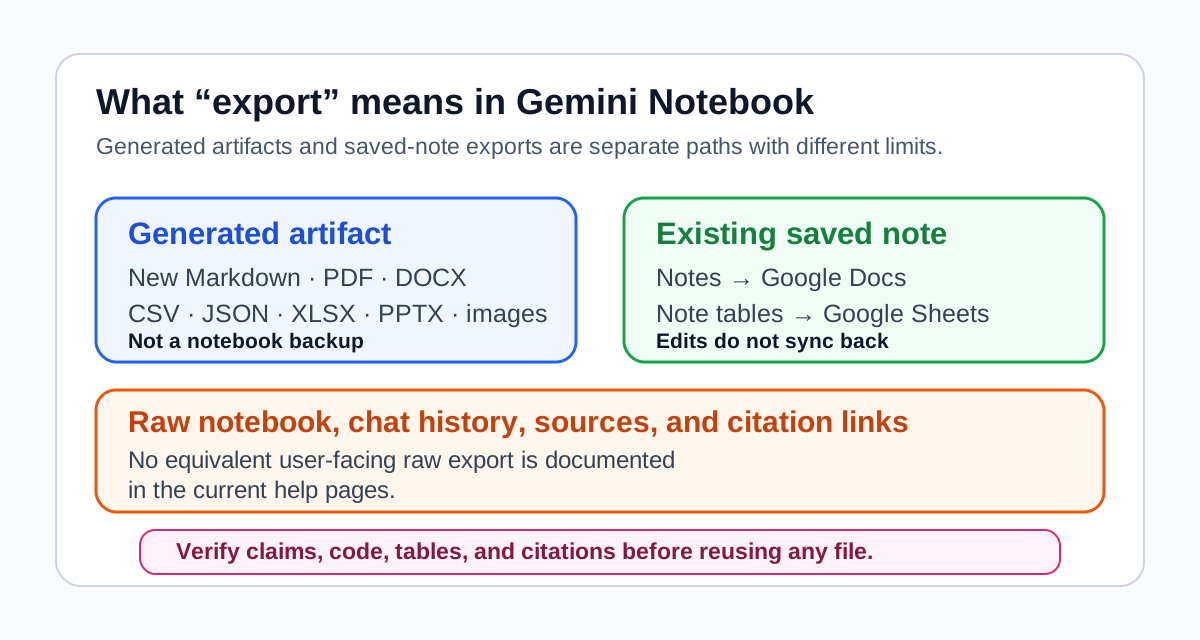
The practical takeaway is narrower than the launch language: Gemini Notebook is a stronger handoff layer between source-grounded reading and reusable research artifacts, but the word export does not mean the same thing for every type of content.
If you are new to the tool, start with how to use NotebookLM for literature review. If your issue is keeping source packets current, read the NotebookLM Google Drive sync workflow. If you are comparing it against a more general assistant, use NotebookLM vs ChatGPT for research and studying.
What changed in June and July 2026
For accounts included in the rollout, Google's June 8 NotebookLM announcement lists four changes that matter for research workflows:
- The product now runs on Gemini 3.5 and Antigravity.
- Each notebook has access to a secure cloud computer for code execution.
- Studio can generate more downloadable output formats.
- Users can start from loose ideas and let the product help discover relevant web sources, while still controlling which sources are added.
Google then renamed NotebookLM to Gemini Notebook on July 16 and said the secure cloud computer would expand to Pro users on the web over the following weeks. Feature availability can differ by account, Workspace entitlement, platform, and rollout stage, so treat the current product UI and official help pages as the final check for your account.
Generated output formats versus saved-note exports
The most important distinction is between creating a new artifact and exporting content that already exists in a notebook.
| Action | Documented path | Important boundary |
|---|---|---|
| Generate a new Studio artifact | Ask Gemini Notebook to create a document, structured-data file, spreadsheet, presentation, chart, or image | This does not export the full notebook, chat history, sources, or citation relationships |
| Export existing saved notes | Send notes to Google Docs; send note tables to Google Sheets | This is separate from the new Studio output formats |
| Obtain a raw notebook or citation-map export | No equivalent user-facing raw export is documented in the current help pages | Do not assume JSON output preserves notebook structure or citation links |
For newly generated artifacts, Google names these output categories:
| Output category | Formats named by Google | Research use |
|---|---|---|
| Documents | PDF, DOCX, Markdown, text files | Briefing notes, literature review outlines, draft memos |
| Structured data | CSV, JSON | Evidence tables, extraction logs, downstream tool input |
| Spreadsheets | XLSX | Paper comparison matrices, coding sheets, audit tables |
| Presentations | PPTX | Seminar outlines, team briefings, project updates |
| Visual outputs | PNG, SVG, JPG, GIF | Charts, diagrams, lightweight explainers |
Researchers rarely finish work inside one AI chat window. The real workflow continues in Word, Google Docs, Zotero, Obsidian, Notion, Excel, Sheets, slide decks, or a static site repository. Downloadable artifacts reduce copy-paste work, but they remain newly generated working files rather than a faithful backup of the notebook that produced them.
What this does not solve
This update does not remove the normal research bottlenecks.
| Claim | Safer interpretation |
|---|---|
| "Gemini Notebook can generate a Markdown file." | Good for editable handoff, but it is not a raw export of existing notes or notebook structure. |
| "Gemini Notebook can create spreadsheets." | Useful for first-pass tables, but extraction still needs checking. |
| "Gemini Notebook can use Google Search to find sources." | Helpful for starting, but source quality and search completeness still need human judgment. |
| "Gemini Notebook can run code." | Useful for analysis and charts, but generated code and results still need review. |
| "Gemini Notebook is more agentic." | Stronger workflow support, not a replacement for method design or citation control. |
The best mental model is: Gemini Notebook can help produce reusable working artifacts from your sources. It does not make those artifacts automatically correct, complete, structurally faithful to the notebook, or citation-ready.
A practical output workflow for research
Use this workflow for a literature review subsection, research memo, or evidence brief. The broader NotebookLM literature review guide covers source selection in more detail; this section focuses on the output handoff.
Step 1: Define the source packet and next tool
Keep one focused notebook for one research question or deliverable. Decide where the output needs to go before asking Gemini Notebook to create it: Markdown for an editorial draft, XLSX for an audit table, JSON for a script, or PPTX for a presentation. If the packet lives in Google Drive and changes over time, use the Drive sync workflow to reduce stale-source risk.
Step 2: Generate an evidence table before prose
Before asking for a polished report, ask Gemini Notebook to create a structured table.
Use only the sources in this notebook.

Create an evidence table for this research question:
[question]

Columns:
1. Source
2. Claim or finding
3. Evidence type
4. Method or data basis
5. Important limitation
6. Source location or citation cue
7. Manual verification needed

Rules:
- Preserve uncertainty.
- Do not merge claims from different sources unless the sources clearly agree.
- If a claim is not directly supported by a source, mark it as "needs verification."
This is the safest first output because it turns a fuzzy synthesis into something you can audit.
Step 3: Generate the format that matches the next tool
Pick the artifact based on the next step, not on what sounds impressive.
| Next step | Better output |
|---|---|
| Edit a long-form article or research memo | Markdown or DOCX |
| Audit claims and source status | CSV or XLSX |
| Feed a structured workflow or script | JSON |
| Present findings to a team | PPTX |
| Archive a static brief | |
| Explain patterns visually | PNG or SVG chart |
For AI Research Reviews style work, Markdown is the most useful format because it can move into an editorial draft, a notes app, or a static-site workflow without heavy formatting cleanup.
Step 4: Use Docs or Sheets for existing saved notes
If the content already exists as saved notes, use the documented note-export path instead of asking for a new artifact. Google's notes help page lists Google Docs for notes and Google Sheets for data tables inside notes. Changes in the resulting Docs or Sheets file do not sync back to the notebook.
Step 5: Verify before writing
Do not move generated or exported prose directly into a final draft.
Use a short verification pass:
- Check each important claim against the original source.
- Inspect methods, limitations, tables, and appendix material.
- Confirm the output did not merge evidence from incompatible sources.
- Move final citations through Zotero, not through generated Gemini Notebook text.
- Keep a copy of the evidence table beside the draft.
If the sources are long PDFs, use the NotebookLM long PDF verification workflow before relying on summary-level answers.
How this changes the Gemini Notebook vs ChatGPT decision
The update makes Gemini Notebook stronger at the source-to-artifact stage.
ChatGPT is still useful when the task starts with a blank page, a messy idea, or a need for flexible drafting. But Gemini Notebook has a clearer advantage when:
- the source set is already known
- citations and source boundaries matter
- you need a table, report, or slide outline grounded in the source packet
- you want a generated handoff file rather than another chat answer
That does not mean Gemini Notebook replaces ChatGPT. A sensible workflow is:
- Use discovery tools to find sources.
- Use Zotero to manage the library.
- Use Gemini Notebook to read across the trusted packet and generate a structured artifact.
- Use ChatGPT to refine language, examples, outlines, or alternative explanations after source verification.
This keeps Gemini Notebook in its strongest lane and avoids asking ChatGPT to verify what a document set actually says.
Best use cases for downloadable artifacts
The new formats are most useful when a generated artifact needs to leave Gemini Notebook.
Strong fits:
- building a Markdown literature review brief from a source packet
- turning a reading set into an XLSX evidence matrix
- creating a PPTX outline for a lab meeting or seminar
- producing a PDF briefing report from mixed sources
- generating charts from structured data inside source files
- generating CSV or JSON for downstream analysis
Weak fits:
- formal citation management
- sensitive unpublished research that should not enter a cloud tool
- final systematic review screening without manual audit
- broad open-ended discovery where database strategy matters
- any claim where a missed limitation would change the conclusion
The update reduces friction. It does not reduce responsibility.
My recommendation
Treat Gemini Notebook as a stronger research production layer, not as a raw notebook-export utility or an autonomous research agent.
The highest-value workflow is:
Discovery -> Zotero -> focused Gemini Notebook -> evidence artifact -> manual verification -> draft
For everyday research work, the practical win is less glamorous than the announcement: fewer copy-paste steps, cleaner handoff files, and a better path from source-grounded synthesis to reusable outputs. Keep the notebook, source library, and final citations as separate records.
FAQ
Sources checked
- Google Blog: NotebookLM is now Gemini Notebook
- Google Blog: Do better research with NotebookLM
- Gemini Notebook Help: Create and add notes
- Gemini Notebook Help: Add or discover new sources
- Google Workspace Updates: Keep your sources up to date with automatic Drive syncing in NotebookLM
Related reading
- NotebookLM for Agentic Research: Where It Fits in 2026
- How to Use NotebookLM for Literature Review
- NotebookLM Google Drive Sync: What It Changes for Literature Review Workflows
- NotebookLM Long PDFs: Avoid Lost-in-the-Middle Summaries
- NotebookLM vs ChatGPT for Research and Studying
- How to Use Zotero with NotebookLM for Research Workflows