Best AI Tools for Knowledge Workers: Reports, Briefs, Research
Compare AI tools for knowledge workers who read reports, synthesize sources, and write briefs. See which tools fit research, drafting, and review workflows.
Most AI tool lists are written for students, general productivity users, or broad office use. That is not very helpful if your real job is reading reports, pulling signal out of long documents, and turning messy information into a clear brief. Knowledge workers need a tighter stack than that.
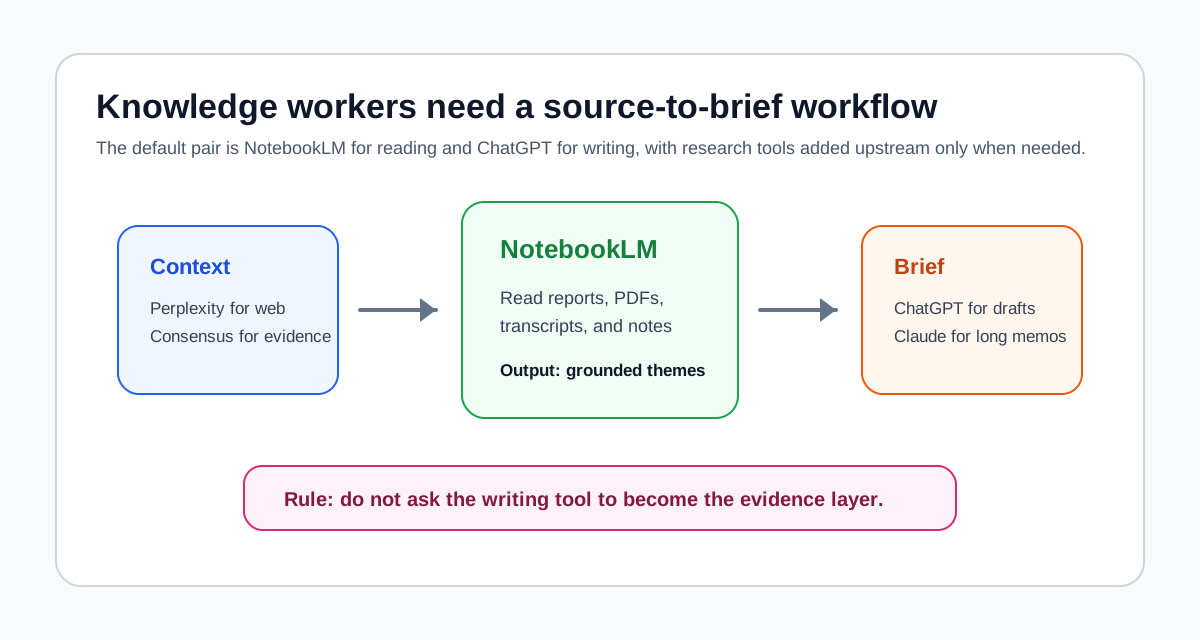
My recommendation is simple: start with NotebookLM and ChatGPT. Add Perplexity if you do a lot of open-web research. Add Claude if your writing is long and nuance-heavy. Add Consensus when published evidence matters. Skip the rest until your workflow gives you a clear reason.
Quick answer
- Start with NotebookLM for reading dense documents and comparing source packs.
- Use ChatGPT for outlines, rewrites, and turning notes into usable drafts.
- Add Perplexity if your job depends on web research before the source set is stable.
- Add Claude if you write long briefs, memos, or strategy documents that need steadier long-form drafting.
- Add Consensus only when your work depends on published research, not just reports and web sources.
Why a knowledge-worker stack is different
Knowledge work is usually not the same as academic literature review.
The source mix is broader. The deadlines are tighter. The outputs are often memos, decision briefs, strategy notes, policy summaries, or stakeholder documents rather than formal papers. That changes which tools are worth paying attention to.
A PhD workflow often starts with paper discovery. A knowledge-worker workflow often starts with a document pack, an internal brief, or an urgent question that requires web context and source comparison. That means the highest-value tools are the ones that reduce reading overload, synthesis friction, and drafting time.
That is why NotebookLM and ChatGPT form the best default pair for this audience. They cover the two stages that consume most time:
- reading and extracting signal from source material
- turning that signal into a clean written output
If you want the more general site-wide version of that logic, AI Research Workflow in 2026: Which Tool for Which Stage is the broader framework behind this article.
Reading dense documents
Best tool: NotebookLM
NotebookLM is the best tool for knowledge workers who spend most of the day inside reports, PDFs, transcripts, slide decks, internal documents, or mixed source packs.
What it does best: It helps you ask grounded questions across your own uploaded materials and compare what those materials actually say.
When to use it in your workflow: Use it after you already have the relevant documents and need to read across them without getting lost.
Main limitation: It is not a web-search tool and it is not the best first stop if you still need to find the materials.
Free tier: Yes.
NotebookLM is especially strong when the real problem is information overload rather than discovery. If you read ten sources and forget how they connect, this is usually the best place to start. It is also the right default if your team works from source packs and you want the synthesis to stay anchored in those documents.
For a deeper walkthrough, How to Use NotebookLM for Research is still relevant even if your sources are not purely academic.
Research and context gathering
Best tool for open-web research: Perplexity
Perplexity is the best add-on when your workflow starts with exploration rather than with a finished document pack.
What it does best: It helps you explore a topic quickly across the open web and move from a broad question to a narrower source set.
When to use it in your workflow: Use it before NotebookLM, when you still need context, terminology, current developments, or initial source discovery.
Main limitation: It is not the strongest tool for deep source-grounded synthesis after the source set is fixed.
Free tier: Yes, with limits.
Perplexity is useful for knowledge workers because many questions begin outside the formal research database. You may need market context, recent developments, policy changes, or industry framing before you can even decide what documents belong in the real analysis set.
Best tool for published evidence: Consensus
Consensus matters when the question is not just "what are people saying?" but "what does published research suggest?"
What it does best: It gives a fast research-grounded view on a question based on published studies.
When to use it in your workflow: Use it when a memo or brief needs an evidence layer from academic research, not just web sources and reports.
Main limitation: It is not the best full literature review or source-synthesis workspace.
Free tier: Yes, with limits.
If your work starts to resemble formal academic review, you may also want Best AI Research Assistant Tools or Best AI Literature Review Tools. But many knowledge workers do not need to go that far.
Writing memos and briefs
Best tool: ChatGPT
ChatGPT is still the best default drafting tool for most knowledge workers.
What it does best: It turns rough notes into outlines, sections, rewrites, and cleaner business-facing prose.
When to use it in your workflow: Use it after you already have grounded notes, key themes, or a source-based structure.
Main limitation: It is not the best tool for source-grounded reading, and it should not be trusted as your primary evidence layer.
Free tier: Yes, with limitations depending on model and usage.
This is where a lot of people misuse ChatGPT. They ask it to discover, synthesize, and draft in one step. That usually creates smooth but unreliable work. ChatGPT is much better when you already know what the sources say and need help shaping the output.
The difference becomes clearer if you compare it directly with NotebookLM. NotebookLM vs ChatGPT for Research, Studying, and Literature Review explains that divide from a source-grounded workflow perspective.
Best secondary drafting tool: Claude
Claude becomes useful when the writing task is long, layered, or tone-sensitive.
What it does best: It handles longer drafting passes and nuanced rewriting more steadily than many users find with shorter-turn assistants.
When to use it in your workflow: Use it when the output is a long brief, strategy memo, or detailed synthesis document rather than a short note.
Main limitation: It does not replace the need for grounded reading and source selection earlier in the workflow.
Free tier: Yes, with limits.
Claude is not the first tool I would tell most knowledge workers to start with. It is a good second or third tool once you know your writing workload actually justifies it.
Meeting and transcript analysis
Best tool: NotebookLM
For transcript-heavy work, NotebookLM usually comes back into the picture.
What it does best: It works well with interview transcripts, meeting notes, call summaries, and related documents when you need to compare patterns across them.
When to use it in your workflow: Use it when the task is to extract themes, disagreements, or repeated concerns from multiple transcript-like sources.
Main limitation: It still depends on having the materials first, so it does not help much with upstream discovery.
Free tier: Yes.
This is one reason NotebookLM often matters more to knowledge workers than to casual users. The job is frequently cross-document synthesis under time pressure, and that is where it earns its place.
How this differs from a PhD stack
A PhD stack usually starts with paper search. A knowledge-worker stack usually starts with document overload.
That is the difference that changes the recommendations:
- PhD users often need Elicit or Semantic Scholar earlier.
- Knowledge workers often need NotebookLM earlier.
- PhD users usually care more about citations and formal evidence trails.
- Knowledge workers usually care more about speed, clarity, and decision-ready synthesis.
If you want the academic version of this article, Best AI Tools for PhD Students and Researchers in 2026 is the right counterpart.
Recommended starter stack
If you are a knowledge worker starting from scratch, begin with these two tools:
- NotebookLM
- ChatGPT
Add these only when the workflow demands them:
- Perplexity for open-web exploration before the source set is fixed
- Claude for longer writing and nuanced memo drafting
- Consensus when the work needs published research rather than only reports and web sources
Skip everything else until the workflow gives you a concrete reason. That is the cleanest way to avoid tool sprawl.
Tool comparison
| Tool | Best For | Source Type | Free Tier |
|---|---|---|---|
| NotebookLM | Reading and comparing document packs | Your uploaded PDFs, docs, URLs, transcripts | Yes |
| ChatGPT | Drafting, rewriting, outlining | User prompts and pasted notes | Yes |
| Perplexity | Broad web research and context gathering | Open web | Yes |
| Claude | Long-form writing and nuanced revision | User prompts and long draft context | Yes |
| Consensus | Fast access to published evidence | Research literature | Yes |
| Elicit | Structured literature search when needed | Research literature | Yes |
Best for whom
Analysts
Analysts should start with NotebookLM and Perplexity if their work depends on fast context gathering and cross-report synthesis. Add ChatGPT when the output needs to become a brief, client note, or executive summary.
Consultants
Consultants usually benefit most from NotebookLM plus ChatGPT, with Claude added only if the writing load is long and high-stakes. The core need is moving from source pack to polished output without repeated manual re-reading.
Product managers
Product managers often need lighter research, but they still benefit from NotebookLM when working across user research notes, strategy docs, roadmaps, and feedback summaries. ChatGPT usually covers the writing side well enough.
Policy researchers
Policy researchers are the most likely to need Consensus in addition to NotebookLM and ChatGPT because their work often depends on published evidence, not just web context and internal material.
What to avoid
Do not buy too many tools too early
Most knowledge workers do not need five paid subscriptions. Start with the pair that matches the heaviest time cost in the workflow. Add only when the current stack stops being enough.
Do not use ChatGPT as the evidence layer
ChatGPT is a writing assistant first in this workflow. It should not be your main system for deciding what the source pack actually says.
Do not use NotebookLM for discovery if the source set does not exist yet
If you still need to search the web and narrow the topic, Perplexity or a search-oriented research tool is the better first step.
Final recommendation
If you read reports all day, start with NotebookLM and ChatGPT.
That is the best default stack because it covers the two biggest costs in knowledge work: getting through dense source material and turning it into clear written output. Add Perplexity if your work starts in the open web. Add Claude if the writing gets longer and more complex. Add Consensus only when the work depends on published research.
Do not build an academic stack unless your workflow is actually academic. Most knowledge workers need fewer tools than they think. They just need the right pair at the right stages.
Related reading
- AI Research Workflow in 2026: Which Tool for Which Stage
- NotebookLM vs ChatGPT for Research, Studying, and Literature Review
- Best AI Research Assistant Tools
- How to Use NotebookLM for Research
- Best AI Tools for PhD Students and Researchers in 2026
Sources and official references
Request the AI research workflow checklist
A practical checklist for choosing when to use NotebookLM, ChatGPT, Elicit, Consensus, Perplexity, Google Scholar, and Zotero.
No hype. Just workflow-first research tool decisions.