Ollama vs NotebookLM for Literature Review: Local Privacy or Source-Grounded Workflow?
Compare Ollama and NotebookLM for literature review workflows. See when local AI privacy matters, when source-grounded reading matters, and how researchers can combine both.
Use NotebookLM when the main job is reading across a trusted source set, asking source-grounded questions, and turning papers into structured notes. Use Ollama when local control, privacy, offline experimentation, or model flexibility matters more than a polished research workspace. For many literature review workflows, the best answer is not Ollama or NotebookLM. It is NotebookLM for source-grounded reading and a local Ollama setup for private drafting, testing, or sensitive notes.
Ollama and NotebookLM both show up in research conversations, but they solve very different problems.
NotebookLM is a source-grounded reading workspace. You add documents, web pages, videos, or other supported sources, then ask questions against that notebook. It is useful when the hard part is understanding a defined source set.
Ollama is a local model runner. You can download and run language models on your own machine, interact through a command line or API, and build a private local workflow around your own hardware. It is useful when the hard part is control: where the model runs, what model you use, and whether a cloud product is appropriate for the material.
That difference matters for literature review. A literature review is not just "summarize these papers." It includes collecting sources, reading them, comparing claims, extracting themes, drafting sections, and managing privacy or compliance constraints. NotebookLM and Ollama fit different parts of that chain.
Check the next step for your research workflow
Pick the situation closest to yours. The recommendation updates inside the article, so you can keep reading with a clearer path.
Local boundary -> approved source packet -> NotebookLM or Zotero -> checked draft
Start with NotebookLM because reading and comparison work best after you already know which sources belong in the working set.
- 1Keep sensitive notes local or in approved systems. Only move cleared source packets into cloud reading tools.
- 2Ask comparison questions across the source packet, then verify the important answer in the original document.
- 3Decide which material must stay local, then use cloud tools only for source packets that are safe to upload.
Ollama vs NotebookLM at a glance
Ollama vs NotebookLM for literature review
The right choice depends on whether your bottleneck is source-grounded reading or local control.
Best starting point
A defined set of papers, notes, reports, or source documents
A local model workflow on your own machine
Best for literature review
Reading, questioning, comparing, and synthesizing uploaded sources
Private experimentation, local drafting, and custom model workflows
Privacy posture
Cloud product with Google account and product policies
Can run locally when configured for local-only use
Setup difficulty
Lower; create a notebook and add sources
Higher; install models, manage hardware, and test output quality
Main weakness
Less control over model choice and local execution
Not a complete source-management or citation workflow by itself
When NotebookLM is the better choice
NotebookLM is usually the better fit when your literature review already has a source set.
That might mean:
- a folder of PDFs from a database search
- papers assigned by a supervisor
- reports and transcripts for a research project
- class readings for a seminar paper
- notes collected around one research question
In that situation, the bottleneck is not local model control. The bottleneck is source-grounded reading. You need to ask what the papers say, compare findings, pull out recurring themes, and avoid drifting into generic AI output.
NotebookLM is designed around that source-centered pattern. You create a notebook, add sources, and ask questions against that material. That makes it a cleaner fit for tasks such as:
- summarizing a paper set
- comparing methods across papers
- extracting recurring findings
- identifying disagreement or gaps
- preparing notes before drafting
- studying from lecture notes or readings
For a more direct workflow guide, see How to Use NotebookLM for Literature Review. If you are deciding between NotebookLM and a general-purpose assistant, NotebookLM vs ChatGPT for Research, Studying, and Literature Review is the better comparison.
When Ollama is the better choice
Ollama is the better fit when local control is the point.
The official Ollama documentation describes a workflow for running models locally, and its FAQ says Ollama does not see your prompts or data when you run locally. It also notes that local-only mode is possible by disabling cloud features. That makes Ollama relevant for researchers who are uncomfortable putting certain material into a cloud product, or who want to experiment with local models as part of a private research stack.
Use Ollama when you need:
- local model execution
- more control over which model is used
- offline or semi-offline experimentation
- private drafting around sensitive notes
- a local API for a custom research tool
- a way to test open models against your own workflow
But this is where the tradeoff becomes real. Ollama is not automatically a literature review system. It does not, by itself, give you a polished notebook interface, source library, citation-aware reading flow, or paper extraction table. It gives you local model infrastructure.
That means Ollama can be useful for research, but it usually needs surrounding workflow design. You may need a document pipeline, retrieval setup, file organization method, or another interface on top of it. Without that, a local model can become a private chat box rather than a reliable literature review workspace.
The privacy tradeoff
Privacy is the main reason many researchers ask about Ollama vs NotebookLM.
The simple version is:
- NotebookLM is easier for source-grounded research work.
- Ollama gives more local control.
- Neither choice removes the need for careful source handling.
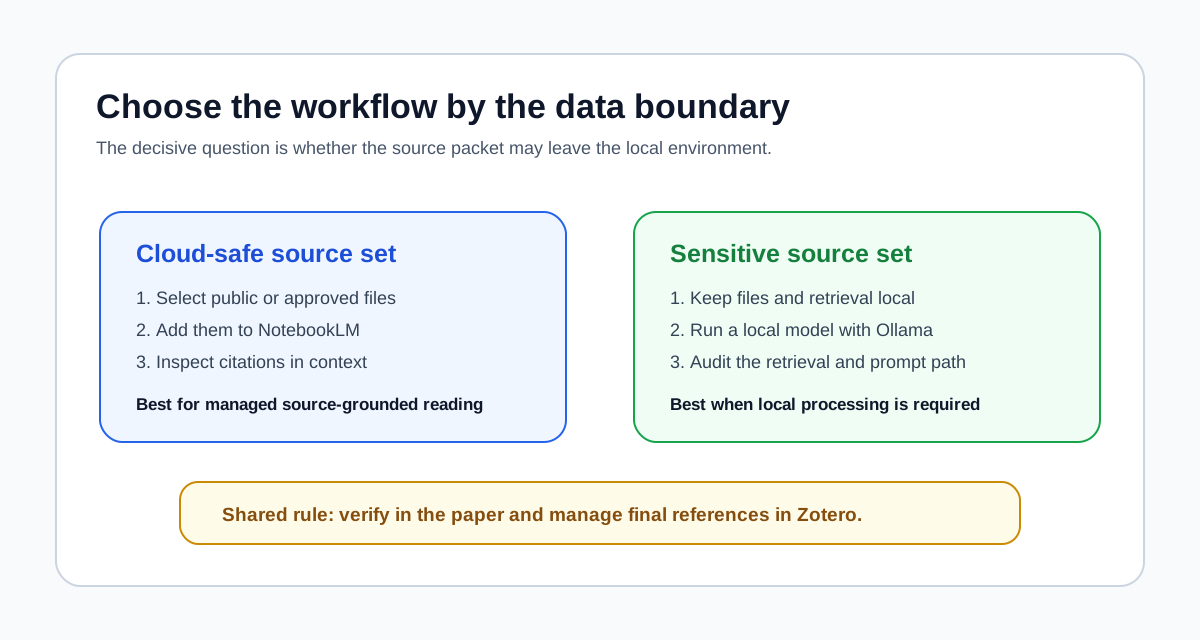
If your documents are public papers, course readings, or non-sensitive web sources, NotebookLM is often the more productive tool. The gain from its source-centered workflow can outweigh the extra setup required for local AI.
If your documents include sensitive interviews, unpublished field notes, confidential reports, restricted institutional data, or material covered by a strict data policy, then local processing may matter more. In that case, Ollama becomes more attractive, but only if the whole workflow is actually local and secure.
That last part is important. A local model is only one piece of the privacy picture. You also need to think about:
- where documents are stored
- whether any retrieval tool sends data to a cloud service
- whether prompts are logged
- who has access to the machine
- whether generated notes contain sensitive details
- whether the model output is good enough to use
Ollama can support a local-first workflow. It does not automatically make the workflow safe or rigorous.
Run a data-boundary test before choosing
Start with the document policy, not the model name. Take one representative source from the real project and answer these questions before building the workflow:
| Check | If the answer is yes | What it rules out |
|---|---|---|
| Must the source remain on a controlled local machine? | Keep the document store, retrieval layer, model, prompts, and notes local | Uploading that source to NotebookLM or another cloud service |
| Do you need citation-linked answers with minimal setup? | Use NotebookLM with material that is approved for cloud processing | Assuming a bare local model already provides source retrieval and citation navigation |
| Does the workflow call any cloud model, web search, hosted embedding service, or remote vector database? | Document that boundary and review it with the same care as the model | Calling the system "local" only because Ollama runs on the machine |
| Will the output support a published claim? | Verify the wording in the original paper and cite through Zotero | Treating either tool's summary as the citable source |
Ollama's current documentation says local runs do not send prompts or data to Ollama, and it provides a local-only setting that disables its cloud features. That setting does not control other software in your stack. A retrieval interface, browser extension, embedding endpoint, sync folder, or backup service can still create an external data path.
For a concrete local reference stack, read the Ollama and Zotero local research workflow. If the source set is not sensitive and the bottleneck is cross-document reading, the Zotero to NotebookLM workflow is usually the simpler starting point.
The literature review workflow split
The cleanest way to compare the two tools is by stage.
1. Collecting papers
Neither Ollama nor NotebookLM is the best paper-discovery tool. If you still need to find papers, start with a search-oriented workflow.
Use tools such as Elicit, Semantic Scholar, Google Scholar, Consensus, or Perplexity depending on the level of rigor required. For a broader stage-by-stage map, see AI Research Workflow: Which Tool to Use at Each Stage in 2026.
2. Reading and questioning sources
NotebookLM usually wins here. It is built around uploaded sources, source-grounded questions, and document-centered synthesis.
Ollama can participate in this stage only if you build or connect a retrieval workflow around it. A local model can summarize pasted text, but source-grounded reading across a paper set takes more than a chat prompt.
3. Private notes and sensitive drafting
Ollama becomes more relevant here. If your notes cannot leave your machine, a local model setup may be the safer direction.
This is especially true for early private thinking: turning notes into rough outlines, testing language, extracting questions, or drafting internal summaries that should not go into a cloud system.
4. Synthesis and argument framing
NotebookLM is better when synthesis must stay close to a source set. Ollama is better when the synthesis needs to happen locally and you are willing to manage the surrounding workflow.
For many users, the practical split is simple: use NotebookLM to understand the sources, then use a local model through Ollama only for private drafting or workflow experiments.
5. Citations and references
Use Zotero or another reference manager. Neither Ollama nor NotebookLM should be treated as the citation layer for serious research writing.
NotebookLM can help you understand sources. Ollama can help with local language tasks. Citation management is a separate job.
A practical combined workflow
Here is a realistic workflow for a researcher who wants both source grounding and local control:
- Use Google Scholar, Semantic Scholar, Elicit, or Consensus to find the paper set.
- Store citations and PDFs in Zotero.
- Upload non-sensitive papers into NotebookLM for source-grounded reading.
- Ask NotebookLM for themes, disagreements, methods, and gaps across the sources.
- Move only non-sensitive structured notes into your drafting workflow.
- Use Ollama locally for private outline testing, wording experiments, or sensitive notes that should not enter a cloud product.
- Return to Zotero and the original papers for citation accuracy.
That workflow treats the tools honestly. NotebookLM is not your privacy layer. Ollama is not your source-management system. Zotero is not your synthesis assistant. Each tool has a job.
Who should choose NotebookLM?
Choose NotebookLM if:
- you want the easiest source-grounded reading workflow
- your sources are safe to use in a cloud product
- you need to compare documents quickly
- you are a student, researcher, or knowledge worker who wants less setup
- your main bottleneck is understanding and organizing a source set
NotebookLM is the better default for most literature review prep because it is closer to the actual reading job.
Who should choose Ollama?
Choose Ollama if:
- local processing is a real requirement
- you want to test open models
- you are comfortable installing and managing local AI tools
- you need a local API for a custom workflow
- your material is sensitive enough that cloud tools are not appropriate
Ollama is the better fit for technical users and privacy-constrained workflows. It is not automatically the better fit for every researcher.
Final recommendation
For most literature review work, start with NotebookLM once your source set exists. It is easier, more source-centered, and closer to the actual reading and synthesis problem.
Use Ollama when local control is a genuine constraint, not just a vague preference. It is valuable when you need to keep drafts, notes, or experiments on your own machine, but it requires more workflow design than NotebookLM.
The best setup may use both: NotebookLM for source-grounded reading where appropriate, Ollama for local private experimentation, and Zotero for references.
Sources
- Ollama documentation: Ollama FAQ
- Ollama documentation: Ollama Quickstart
- Google NotebookLM Help: Create a notebook in NotebookLM
- Google NotebookLM Help: NotebookLM frequently asked questions
- Google NotebookLM Help: Upgrade NotebookLM