SciSpace vs NotebookLM: Which Fits Your Paper Reading Workflow
SciSpace helps you understand one hard paper. NotebookLM helps you compare many papers. A workflow-based comparison for researchers.
SciSpace and NotebookLM both help researchers read papers with AI, but they solve different reading problems. SciSpace is better when you need to understand one paper more clearly. NotebookLM is better when you need to understand what several papers say together.
That is why this is not a close head-to-head contest. The practical choice depends on where the reading friction sits. If your bottleneck is paper comprehension, start with SciSpace. If your bottleneck is cross-source synthesis, start with NotebookLM.
Quick answer
- Use SciSpace when you are reading one paper closely and need help with methods, equations, tables, or dense sections.
- Use NotebookLM when you already have a source set and need to compare papers, extract themes, and keep your notes grounded in those sources.
- Use both when your workflow starts with close reading and then expands into synthesis across multiple papers.
- Do not use SciSpace as your main cross-source synthesis workspace.
- Do not use NotebookLM as your first tool when the real problem is understanding a single difficult paper.
Request the AI research workflow checklist
A practical checklist for choosing when to use NotebookLM, ChatGPT, Elicit, Consensus, Perplexity, Google Scholar, and Zotero.
No hype. Just workflow-first research tool decisions.
SciSpace has also published a June 2026 literature-search benchmark comparing SciSpace, Elicit, and Consensus. That is useful context for search workflows, but it is not the same question as this page. Here the decision is narrower: whether the reading problem is one difficult paper or a selected source set.
SciSpace vs NotebookLM at a glance
These tools fit different parts of a paper-reading workflow.
Best starting point
A curated source set
One difficult paper
Core strength
Comparing and synthesizing uploaded sources
Explaining and unpacking a paper
Source handling
Best for reading across multiple PDFs, docs, and URLs
Best for paper-by-paper reading
Citation grounding
Grounded in your uploaded source base with inline citations
Grounded in the paper you are reading
Best workflow stage
Reading across sources and synthesis prep
Close reading
Main limitation
Not ideal for walking through one hard paper line by line
Weak for multi-source synthesis
Reading a single paper
SciSpace wins clearly when the task is understanding one paper better.
This matters more often than people admit. A lot of research friction is not caused by having too many papers. It is caused by one or two papers that are method-heavy, terminology-heavy, or simply written in a way that slows the reader down. In that situation, a tool that helps you unpack the paper itself is more useful than a tool designed for broader synthesis.
SciSpace is strongest when you need to:
- clarify a dense abstract or methods section
- understand what a table or figure is actually showing
- interpret unfamiliar terminology
- get through a hard paper without losing the main thread
The practical reason SciSpace works well here is that the reading interaction stays focused. You are not trying to build a whole evidence map yet. You are trying to make one paper readable enough to use.
This is where NotebookLM is often the wrong first move. NotebookLM can certainly answer questions about a single uploaded paper, but that is not where it creates the most value. If you are reading one difficult article and want tutoring-style clarification, SciSpace is usually the cleaner fit.
Reading across a source set
NotebookLM wins clearly when the reading problem is no longer one paper but a source base.
Once you already have several relevant PDFs, reports, or URLs, the workflow changes. The hard part is no longer comprehension alone. The hard part is maintaining continuity across sources without losing what each one contributes. That is the kind of reading NotebookLM is built for.
Use NotebookLM when you need to:
- ask source-grounded questions across several papers
- compare findings across documents
- extract themes before writing
- prepare for a literature review or synthesis memo
That is why NotebookLM is so often the better recommendation for readers working through a literature review stack. It is less useful as a line-by-line explainer, but much more useful once the source set becomes the unit of work. If that is the stage you are in, How to Use NotebookLM for Research is the more relevant next step than a single-paper reading guide.
The biggest mistake here is treating NotebookLM like a search tool or a tutoring tool first. It is neither. It is best understood as a reading-and-synthesis workspace for sources you already chose.
When to use both
The strongest workflow is often sequential.
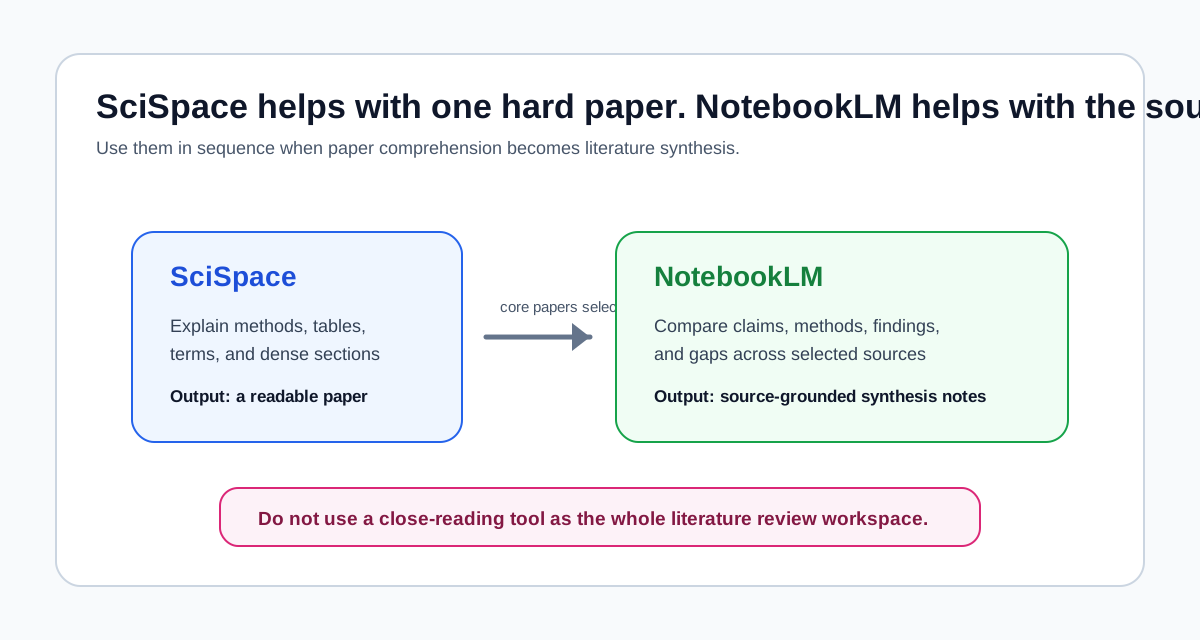
Here is the practical version:
- Use SciSpace to understand the hardest individual papers in your set.
- Once you know which papers actually matter, move the core set into NotebookLM.
- Ask NotebookLM to compare claims, methods, results, and disagreements across those papers.
- Turn the resulting notes into structured synthesis or drafting support.
This sequence is especially useful for literature review work. Many researchers start with scattered reading, get stuck in the paper-by-paper stage, and never move into synthesis cleanly. SciSpace helps you get through the hard papers. NotebookLM helps you stop thinking of them as isolated readings and start treating them as a connected evidence base.
If your workflow starts even earlier, with finding papers rather than reading them, then Elicit vs NotebookLM: Paper Discovery vs Source Synthesis is the better comparison to read first.
When not to use SciSpace
SciSpace is not the best tool when your project already depends on cross-source reasoning.
Avoid making SciSpace your main workspace if:
- you need theme extraction across many papers
- you want one notebook-like place for multi-source questioning
- your reading set includes papers plus reports, notes, transcripts, or other mixed materials
- the bottleneck is synthesis rather than comprehension
In those cases, SciSpace may still help with a few difficult papers, but it should not be your center of gravity.
When not to use NotebookLM
NotebookLM is not the best tool when you are still trying to understand one paper well enough to decide whether it belongs in the project at all.
Avoid defaulting to NotebookLM if:
- the paper is highly technical and you need close explanation first
- you do not yet have a stable source set
- you are still screening papers rather than reading across them
- your main need is educational clarification rather than source comparison
This is the same broader mistake people make when comparing NotebookLM with general assistants. The better question is not which tool is smarter. The better question is which tool matches the stage of the workflow. NotebookLM vs ChatGPT for Research, Studying, and Literature Review makes that distinction from a drafting-and-study angle; this article is the paper-reading version of the same logic.
Best for whom
Students
Students should usually start with SciSpace if the immediate problem is understanding assigned papers. A lot of coursework reading is not yet large enough to justify a NotebookLM-centered synthesis workflow. NotebookLM becomes more useful once the assignment turns into a reading pack, seminar review, or source-based paper where comparison across documents matters.
The simple rule is:
- use SciSpace to get through hard readings
- use NotebookLM once the assignment depends on comparing several readings together
Researchers
Researchers usually get more value from NotebookLM, but not at every moment.
If you are doing literature review work, NotebookLM is usually the stronger default because the core task is not understanding one paper in isolation. It is comparing a source set and turning that comparison into usable structure. SciSpace still matters when a few papers are unusually dense or method-heavy, but it is often a supporting tool rather than the main environment.
Knowledge workers
Knowledge workers often do not read only journal articles. They read reports, briefs, transcripts, white papers, and internal documents. That pushes the workflow toward NotebookLM more quickly because the reading challenge is usually cross-document synthesis, not paper-by-paper interpretation. SciSpace becomes useful only when a specific academic paper or technical document is hard enough to justify closer explanation.
Final recommendation
If your bottleneck is understanding one paper, choose SciSpace.
If your bottleneck is comparing several sources and preparing synthesis, choose NotebookLM.
If you can use both, do that in sequence. Read difficult papers with SciSpace first, then move the core source set into NotebookLM for grounded comparison and synthesis. That is the strongest workflow because it respects what each tool is actually good at.
NotebookLM is the better general recommendation for literature review and source-heavy research. SciSpace is the better tactical recommendation for close reading. The wrong move is forcing either one to cover the whole workflow.
Common questions
Choose the next guide based on where your reading workflow is stuck.
Related reading
- How to Use NotebookLM for Research
- NotebookLM vs ChatGPT for Research, Studying, and Literature Review
- Elicit vs NotebookLM: Paper Discovery vs Source Synthesis
- AI Research Workflow in 2026: Which Tool for Which Stage