NotebookLM in April 2026: A Research Workflow Snapshot
A dated snapshot of how NotebookLM supported source-grounded research workflows in April 2026, with links to current Gemini Notebook guidance.
In April 2026, NotebookLM behaved less like a clever note companion and more like a structured research workspace. The most important change was not one isolated feature. It was the way NotebookLM organized work around sources, grounded chat, and reusable outputs, which made the product fit real literature review and summarization workflows more cleanly.
That is why this snapshot matters. Many AI tools still help at the edges of research, but NotebookLM was getting stronger in the middle of the process: the stage where you already have material, need to understand it, compare it, and turn it into something you can write from.
This page records the product as evaluated on April 24, 2026. Google renamed NotebookLM to Gemini Notebook on July 16, 2026. For the current product direction, read the Gemini Notebook agentic research guide and the Gemini Notebook export workflow guide.
Quick answer
- As of April 24, 2026, NotebookLM is best understood as a source-grounded research workflow tool, not just a note tool.
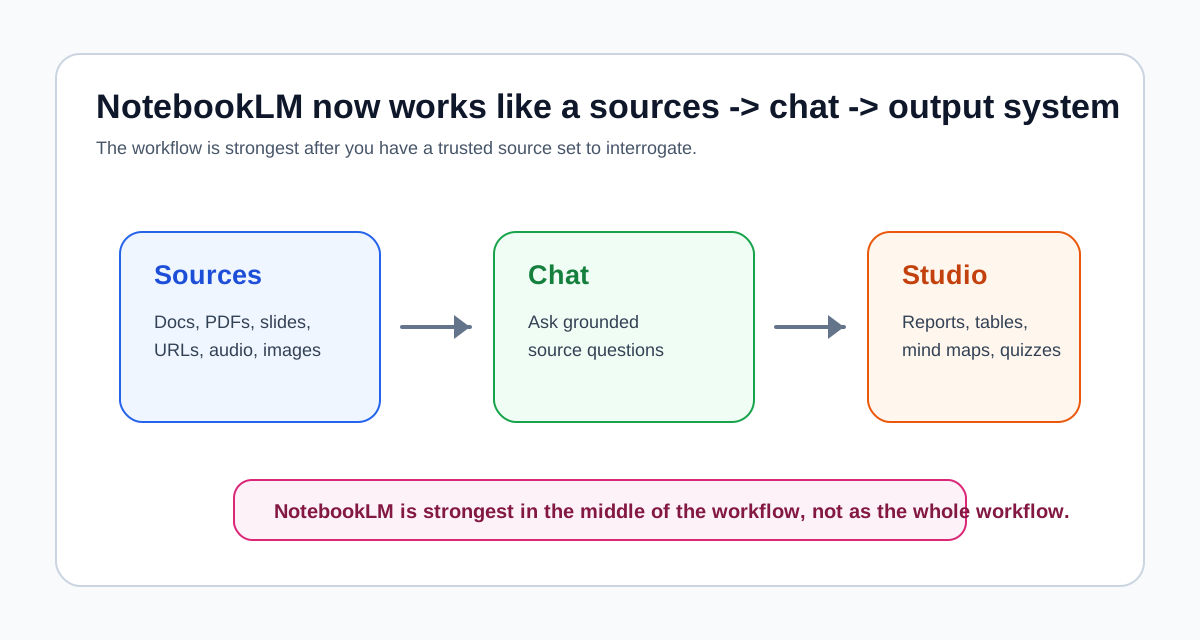
- The biggest practical change is the clearer workflow: Sources -> Chat -> Studio outputs.
- Deep Research and broader source support make it easier to build a stronger source base, but NotebookLM still is not the best first stop for open-ended discovery.
- For literature review and summarization, the product is more useful now because it helps move from uploaded material to structured reports, notes, mind maps, and tables.
- The right way to use NotebookLM is still narrow and practical: collect trusted material first, then use NotebookLM to read across it and prepare synthesis.
What NotebookLM is
NotebookLM is Google's source-grounded AI research assistant. In official help documentation, Google describes it as a tool for uploading or discovering sources, chatting with those sources using inline citations, and transforming the material into outputs such as study guides, briefings, audio overviews, and mind maps.
That framing matters because it explains where NotebookLM belongs in a broader AI stack. It is not the strongest tool for open-web exploration, and it is not a final drafting environment. It is strongest when the work already has a source base and the next job is to understand, compare, summarize, and structure that material.
That is also why NotebookLM still pairs well with other tools. If you are deciding where it fits relative to broader workflow choices, AI Research Workflow: Which Tool for Which Stage is still the best foundation. If you are comparing source-grounded work against more flexible drafting help, NotebookLM vs ChatGPT for Research, Studying, and Literature Review is the better comparison.
What the April 2026 snapshot captured
The clearest way to describe NotebookLM in April 2026 is to look at three layers of the workflow: source collection, grounded interaction, and outputs.
1. Source collection is broader and more practical
Google's November 13, 2025 NotebookLM update added Deep Research and support for more source types. Current help documentation now reflects a wider and more practical source model, including:
- Google Docs
- Google Slides
- Google Sheets
- Microsoft Word files
- PDFs
- text and markdown files
- web URLs
- public YouTube URLs
- audio files
- images
This is a meaningful update for research workflows because the source base is rarely made of PDFs alone. Real projects often involve reports, spreadsheets, slide decks, transcripts, notes, and reference pages. NotebookLM is now better aligned with that reality.
The limitation still matters. Even with Deep Research and source discovery features, NotebookLM is not the strongest place to begin from a vague topic and search the open literature from scratch. Discovery-first tools still matter earlier in the process. For that stage, pages like Best AI Research Assistant Tools or Best AI Tools for Knowledge Workers are more useful starting points.
2. Chat is more clearly grounded and configurable
Current NotebookLM help documentation makes the chat model much clearer than before:
- responses use direct quotes, text, and images from your sources as citations
- you can include or exclude specific sources before asking a question
- you can configure chat style and response length
- you can save useful chat responses into notes
This is a genuine workflow improvement. The research benefit is not that NotebookLM sounds more conversational. The benefit is that the questioning layer is now easier to treat as a deliberate evidence step rather than a generic chat session.
If your work depends on asking, "What do these sources agree on?", "Where is the evidence weak?", or "Which document supports this claim?", NotebookLM is closer to a structured reading environment than it used to be.
3. Studio outputs are now central, not secondary
The most important product shift is the growing role of Studio. Google's current NotebookLM documentation shows a broader set of output types in the Studio panel, including:
- notes
- reports
- data tables
- mind maps
- audio overviews
- video overviews
- flashcards or quizzes
Some of these are more useful for research than others. Reports, notes, data tables, and mind maps are the most relevant for serious reading and synthesis work. Flashcards and quizzes are more useful for study workflows than for literature review, but they still reflect the same product direction: NotebookLM is becoming an output system, not just a place to ask questions.
That is the real change. NotebookLM is evolving from a note tool into a structured research workflow system.
The new workflow: Sources -> Chat -> Output
The most useful way to understand NotebookLM now is through a simple three-step workflow.
Sources
This is the foundation. You add or discover the material that will define the notebook.
This stage works best when:
- the source set is coherent
- the notebook is tied to one topic or one research question
- the documents are relevant enough to compare against each other
This stage works poorly when:
- the notebook is just a dump of unrelated files
- you are still unclear about the topic
- the real need is broad paper discovery, not source-grounded reading
Chat
This is where NotebookLM helps you interrogate the source base. You ask questions, narrow scope, include or exclude sources, and pressure-test your understanding.
The practical value of Chat is not that it replaces reading. It shortens the distance between reading and first-pass interpretation. That is especially useful for literature review, report analysis, and source-heavy studying.
Output
This is where the workflow improvement becomes most visible. Instead of stopping at answers in a chat box, you can produce structured artifacts you can actually reuse:
- a report to prepare synthesis
- a data table for source comparison
- a mind map for topic structure
- notes for ongoing analysis
- an audio or video overview for quick review
This is why the April 2026 product state mattered for research. The workflow carried you farther before you needed to leave the tool.
How to use the new NotebookLM workflow for research
The practical question is not whether NotebookLM has more features. It is how to use the new structure without turning the notebook into clutter.
Step 1: Start with a narrow notebook
Build one notebook around one real question, project, or literature cluster.
Good examples:
- one literature review topic
- one policy question
- one grant background pack
- one seminar reading list
Bad examples:
- all papers from an entire semester
- random saved articles across multiple themes
- one notebook for every research project you may eventually care about
NotebookLM gets stronger when the notebook boundary is clear.
Step 2: Build the source set before you over-chat
Upload the core material first. That may include papers, reports, lecture notes, slide decks, and relevant web pages.
If you are still collecting and evaluating what belongs, do that before treating NotebookLM as the main workspace. This is still one of the most important discipline points from How to Use NotebookLM for Research: the notebook works best after the source question is mostly settled.
Step 3: Use Chat to map the evidence
Ask questions that reveal structure rather than asking for one generic summary.
Useful prompts include:
- What themes recur across these sources?
- Which sources disagree most directly?
- What evidence is repeated, and what evidence appears only once?
- What important questions remain unanswered by this source set?
- Which source should I read first if I only have 20 minutes?
This stage helps you see whether the notebook is actually coherent enough to support synthesis.
Step 4: Narrow sources when the question narrows
One underappreciated improvement in NotebookLM is the ability to include or exclude sources before asking a question. Use that actively.
For example:
- compare only the top 5 papers, not the full reading pack
- isolate one subgroup of sources for a narrower claim
- exclude background readings when asking for contradictions
That small workflow behavior often matters more than a bigger feature launch. It keeps the notebook useful when the project becomes more specific.
Step 5: Generate an output before you draft
Once the source set and questions are stable, use Studio to make a reusable artifact.
For research, the most practical outputs are usually:
- Reports for structured synthesis
- Data tables for comparing methods, findings, or claims
- Notes for preserving grounded insights
- Mind maps for seeing structure before outlining
This is where NotebookLM has become meaningfully better. It now supports a clearer handoff between reading and writing.
Step 6: Move to a writing tool only after the thinking is clear
NotebookLM is better than before at preparing a draft-ready knowledge base, but it is still not the best place for polished prose. For that stage, a general drafting assistant or direct writing pass is still more effective.
That is why the cleanest sequence is:
- collect sources
- interrogate them in NotebookLM
- generate structured outputs
- draft elsewhere if needed
Real use cases
Literature review
This was the clearest use case for NotebookLM in the April 2026 snapshot.
A good literature review workflow now looks like this:
- collect a focused set of papers
- upload them into one notebook
- ask Chat for recurring themes, disagreements, and gaps
- generate a report or table in Studio
- use that artifact to outline the review
That is better than older "ask for a summary" workflows because it creates a reusable intermediate layer. If this is your main task, How to Use NotebookLM for Literature Review remains the most directly relevant companion read.
Source summarization
NotebookLM is also better now for summarization, especially when summarization is not the final goal.
That distinction matters. Generic AI summaries are easy to get. What is harder is producing a summary that is:
- grounded in the actual source set
- usable in a larger research process
- structured enough to support a decision or a draft
NotebookLM is better at that now because the new workflow gives you:
- source control
- grounded chat
- reusable outputs
This makes it more useful for summarizing:
- long reports
- policy briefs
- meeting packets
- mixed research bundles
Paper reading
NotebookLM still is not the best tool for highly detailed line-by-line paper tutoring. Other tools can be stronger for single-paper explanation. But it is much better now when the reading task spans multiple papers and the real job is comparison.
That is why the updated workflow is stronger for:
- reading a paper set before a seminar
- comparing methods across several studies
- identifying repeated findings across a literature cluster
- preparing a first-pass source map before writing
Tips and best practices
Keep one notebook tied to one decision
NotebookLM gets messy when a notebook tries to answer too many different questions. The cleanest notebook is built around one decision:
- What does this literature say?
- What gaps remain?
- How should I summarize these sources?
- What should I outline next?
Use reports and tables more than novelty outputs
Audio and video overviews are useful, especially for review and study, but researchers will usually get more value from reports, notes, and data tables. Those outputs are closer to the work that actually needs to be done.
Treat Deep Research as a helper, not a full replacement for discovery
Deep Research improves source gathering, but it does not eliminate the need for judgment. You still need to decide which sources belong in the notebook and which ones should stay out.
Do not use NotebookLM as a final authority
The model is grounded, but the conclusion is still yours. NotebookLM can help surface themes, contradictions, and missing evidence. It should not replace source checking or interpretive judgment.
Use it when your bottleneck is the middle of the workflow
NotebookLM is worth using when the hardest part of the work is:
- getting through dense material
- comparing sources
- turning reading into structured notes
It is less useful when your bottleneck is still discovery or final writing.
Best for whom
Students
NotebookLM is strongest for students when coursework is source-heavy. It is especially useful for seminar reading packs, paper comparison, and study preparation grounded in assigned material. It is less useful as a general-purpose tutor when the real need is broad explanation rather than source-based work.
Researchers
Researchers benefit most when they already have a source set and need to turn it into usable synthesis. Literature review, structured comparison, and background synthesis are the best fits. It is less useful as a standalone discovery engine or as a full autonomous research agent.
Knowledge workers
Knowledge workers benefit when the source set is made of reports, strategy documents, transcripts, slides, and internal reference material. The broader source support and Studio outputs make NotebookLM more viable for briefing and synthesis work than before. It is less useful when the job is still open-web exploration or persuasive drafting.
Final recommendation
The April 2026 snapshot remains useful because it documents a workflow shift, not because it represents the product's current feature ceiling.
My recommendation is clear:
- use NotebookLM when you already have material and need to understand, compare, and structure it
- do not rely on NotebookLM as your main discovery tool
- do not confuse grounded outputs with finished analysis
The biggest product shift is the Sources -> Chat -> Output workflow. That is what makes NotebookLM feel more mature in 2026. It is becoming less like a smart notebook and more like a structured research system for the middle of real work.
If your workflow is literature review, source summarization, or paper-set reading, the workflow documented here is still useful. If your workflow begins with open-ended search or ends with polished long-form writing, Gemini Notebook is still only one part of the stack.
Related reading
- How to Use NotebookLM for Research
- NotebookLM vs ChatGPT for Research, Studying, and Literature Review
- AI Research Workflow: Which Tool for Which Stage
- Best AI Research Assistant Tools
- Best AI Tools for Knowledge Workers
- Gemini Notebook Agentic Research and Synthesis Workflows
- Gemini Notebook Export Formats and Research Workflow
Sources and official references
- NotebookLM adds Deep Research and support for more source types
- Learn about NotebookLM
- Create a notebook in NotebookLM
- Use chat in NotebookLM
- Create and add notes in NotebookLM
- Add or discover new sources for your notebook
- Use Mind Maps in NotebookLM
- Generate Audio Overview in NotebookLM
- Generate Flashcards or Quizzes in NotebookLM
- Generate an Infographic in NotebookLM
- Generate a Slide Deck in NotebookLM
- NotebookLM product page
- Google: NotebookLM is now Gemini Notebook