How to Use AI for Reading Research Papers Faster
A 3-pass method for reading research papers with AI: triage with Elicit, deep-read with SciSpace, synthesize with NotebookLM.
The problem is not that you cannot read papers. The problem is that you have too many papers and not enough time to read them well. AI is useful here, but only when it reduces reading friction without replacing the hard parts that still require judgment.
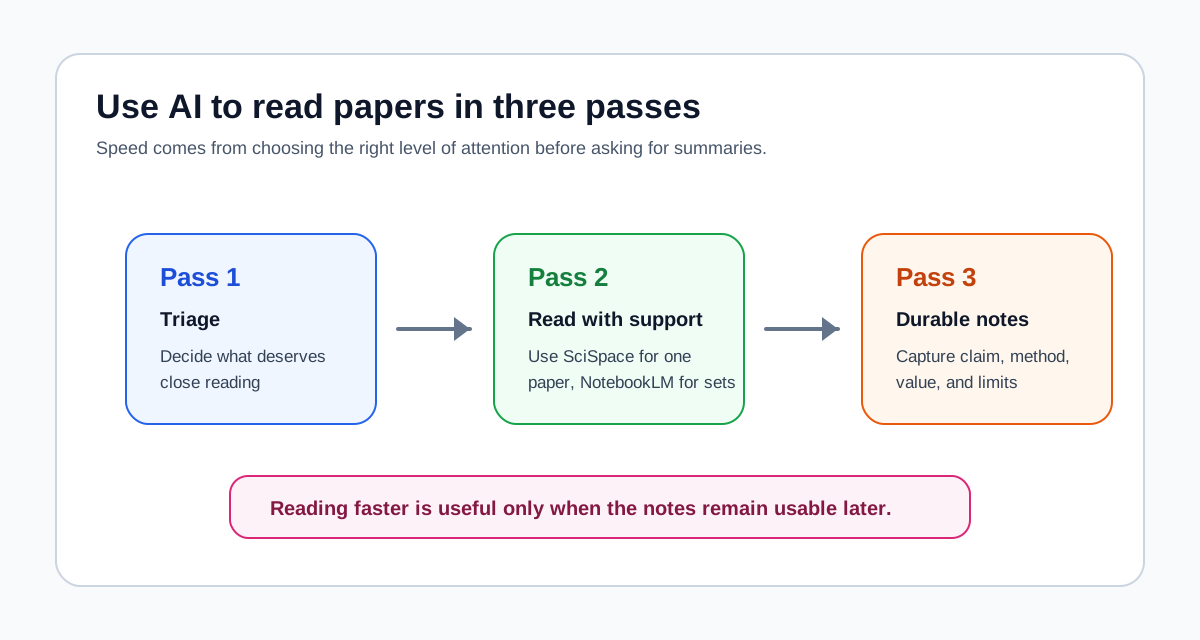
That is why the best way to use AI for paper reading is not to ask for one big summary and hope for the best. The better approach is to break the workflow into passes: decide what deserves attention, read with the right kind of AI help, then turn the reading into notes you can actually use later.
Quick answer
- Use AI in three passes: decide what to read, read with support, then turn the reading into structured notes.
- Use Elicit or another research-search tool before reading if you still need to narrow the paper set.
- Use SciSpace when the bottleneck is understanding one dense paper.
- Use NotebookLM when the bottleneck is comparing several papers and extracting themes across them.
- Use AI to speed up reading and note-making, not to replace critical judgment about what a paper actually shows.
Why AI helps at all
Most paper-reading time is not spent on the final conclusion. It is spent on friction:
- deciding whether a paper is worth reading closely
- getting through dense sections without losing the thread
- remembering what each paper contributed
- comparing papers after the first reading pass
- turning reading into notes that are still useful a week later
AI helps most when it reduces those forms of friction. It helps least when readers expect it to do the intellectual work for them.
That distinction matters. If you let AI replace the reading entirely, you usually get shallow understanding, weak citation habits, and notes that collapse during drafting. If you use AI as structured support, you can move faster without losing the source-grounded core of the work.
This is the same broader principle behind AI Research Workflow in 2026: Which Tool for Which Stage. Research is not one task. Reading papers is also not one task.
Pass 1: Decide what to read
The first pass is triage, not comprehension.
Most readers waste time by reading too deeply too early. They open ten papers and try to absorb each one with the same level of care. That is rarely efficient. A better workflow starts by deciding which papers deserve close reading at all.
In this pass, AI should help you answer questions like:
- Is this paper directly relevant to my question?
- Is it foundational, recent, or just adjacent?
- Does it look methodologically important enough to keep?
- Is this something I need to read fully, skim, or discard?
Tools like Elicit are useful here because they help narrow the paper set before you invest in reading time. If you are still working on this stage, Best AI Literature Review Tools and Elicit vs NotebookLM: Paper Discovery vs Source Synthesis are better starting points than a pure reading guide.
The practical rule is simple:
- do not deep-read every paper you find
- decide first which papers deserve that effort
Pass 2: Read with AI support
This is where most readers ask the wrong question. They ask which AI tool is best for reading papers. The better question is what kind of reading problem you are trying to solve.
Use SciSpace for close reading
SciSpace is more useful when the paper itself is hard to understand.
Use it when you need help with:
- technical language
- confusing methods sections
- dense tables or figures
- equations or specialized terminology
This is the right move when one paper is slowing everything down. You do not need a whole synthesis workspace yet. You need the paper to become legible enough to evaluate and use.
A practical prompt you can try right now is:
Explain the main claim, method, and result of this paper in plain English, then tell me what would matter most if I were citing it in a literature review.
Another useful prompt is:
Which section of this paper should I read most closely if I want to evaluate whether the evidence actually supports the conclusion?
Those prompts work because they keep the AI tied to the reading task, not to generic summarization.
Use NotebookLM for reading across multiple papers
NotebookLM is more useful when the challenge is no longer one paper but several.
Use it when you need to:
- read across a paper set
- compare claims or findings
- identify recurring themes
- prepare source-grounded notes for synthesis
This is the step most people skip. They read each paper separately, make scattered notes, and then expect drafting to solve the organization problem later. It usually does not.
Here is what I actually do when the paper set is stable enough:
- Upload the core papers into NotebookLM.
- Ask cross-source questions instead of paper-by-paper questions.
- Save the strongest source-grounded notes before drafting starts.
A practical prompt you can use is:
What do these papers agree on about [topic]? Where do they disagree, and which disagreements appear to come from method, sample, or framing differences?
Another strong prompt is:
Compare how these papers define the core concept, what evidence each one uses, and where the main gap in the literature still seems to be.
If you want the longer version of that workflow, How to Use NotebookLM for Research and SciSpace vs NotebookLM: Which Fits Your Paper Reading Workflow are the two most relevant follow-ups.
If you want a faster starting point for paper reading or source summarization, use the free Research Prompt Generator. It gives you structured prompts for reading notes, source summaries, literature review comparison, and research-question exploration.
Pass 3: Turn reading into notes
This pass matters more than most people realize.
Reading faster is not useful if the output disappears into scattered highlights, vague summaries, and screenshots you never revisit. The goal of AI-assisted reading is not just speed. The goal is durable notes that reduce friction later in synthesis and drafting.
Your notes after reading should usually include:
- the paper's main claim
- the method or evidence base
- what makes the paper worth keeping
- how it connects to other papers in the set
- what you would still need to verify later
The most useful way to think about this is that reading notes are not mini-essays. They are decision-support for your future self. Good notes tell you why a paper matters, how much you trust it, and how it fits the larger conversation.
NotebookLM is often stronger than a generic assistant here because it keeps the note-making grounded in the uploaded source set. ChatGPT becomes more useful later, once you want to turn those notes into outlines or prose. If you are still choosing between those roles, NotebookLM vs ChatGPT for Research, Studying, and Literature Review is the right comparison.
A simple workflow that works
If you are doing a literature review or reading-heavy class project, a practical workflow looks like this:
- Use a discovery tool to narrow the paper set.
- Use SciSpace only for papers that are unusually dense or hard to interpret.
- Move the core source set into NotebookLM once you know which papers matter.
- Ask cross-source questions and save grounded notes.
- Only then move into outlining or drafting.
This is not the only valid workflow, but it is a good default because it respects the real bottleneck at each stage.
Common mistakes
Letting AI replace the reading
This is the worst mistake because it creates the illusion of progress. If you only consume summaries, you often lose the distinction between the paper's actual evidence and the assistant's smoothing. That makes later synthesis weaker.
Reading too deeply before triage
If you deep-read everything, AI cannot save much time. The first gain comes from deciding what deserves full attention and what does not.
Using one tool for every reading problem
SciSpace and NotebookLM are not interchangeable. Use SciSpace when the issue is understanding a paper. Use NotebookLM when the issue is understanding a source set.
Turning notes into generic summaries
Your notes should preserve judgment, comparison, and next-step usefulness. A clean summary is not enough if it does not help with later writing or analysis.
Best for whom
Students
Students should keep the workflow simple. Use AI to understand assigned papers faster and to compare readings more clearly, but do not overbuild the stack. In most cases, one reading-support tool plus one writing assistant is enough.
Researchers
Researchers should care most about note quality and synthesis readiness. The goal is not just finishing papers faster. The goal is creating a reading process that can scale across a review or research project without forcing repeated re-reading.
Knowledge workers
Knowledge workers often read reports, briefs, and white papers in addition to academic papers. That usually makes NotebookLM more attractive because the reading challenge becomes mixed-source synthesis rather than only paper comprehension.
Final recommendation
Use AI for reading papers in three passes: triage first, close reading second, structured notes third.
If one paper is the problem, use SciSpace. If the source set is the problem, use NotebookLM. If you are still narrowing the literature, use a discovery tool before either of them. That is the cleanest way to read faster without turning your workflow into a pile of shallow summaries.
The strongest reading workflow is not the one with the most tools. It is the one that keeps each tool in the stage where it is actually useful.
Related reading
- AI Research Workflow in 2026: Which Tool for Which Stage
- How to Use NotebookLM for Research
- SciSpace vs NotebookLM: Which Fits Your Paper Reading Workflow
- Elicit vs NotebookLM: Paper Discovery vs Source Synthesis
- Best AI Literature Review Tools