AI Systematic Review Workflow: Perplexity, Elicit, and Consensus
A practical AI-assisted systematic review workflow: use Perplexity for scoping, Elicit for screening and extraction, and Consensus for claim checks.
Use Perplexity to scope the topic and find search language, Elicit to run structured screening and data extraction, and Consensus to pressure-test specific claims. Do not use any of them as a one-click replacement for PRISMA-style rigor. The workflow works best when each tool has a narrow job and every final claim is checked against primary sources.
AI can make a systematic review workflow faster, but it can also make the work less defensible if you let one tool blur every stage together. The practical question is not "which AI tool can write my review?" The better question is: which tool should help at each stage without breaking traceability?
This guide gives you a citation-first workflow for using Perplexity, Elicit, and Consensus together. It is designed for researchers, graduate students, and research-heavy teams that need a review process they can audit later: a clear question, explicit inclusion logic, a screened paper set, extraction notes, claim-level checks, and a final synthesis with visible confidence boundaries.
Who this workflow is for
Use this workflow if you are:
- scoping a systematic literature review before formal database work
- building a defensible evidence map for a thesis, report, or policy memo
- comparing studies across outcomes, populations, or methods
- trying to avoid the common mistake of treating AI summaries as final evidence
Do not use this workflow if you want:
- a fully automated systematic review
- a shortcut around protocol design, screening criteria, or source verification
- medical, regulatory, or high-stakes evidence synthesis without expert review
Check the next step for your research workflow
Pick the situation closest to yours. The recommendation updates inside the article, so you can keep reading with a clearer path.
Perplexity or Scholar -> Consensus check -> Elicit screening -> Zotero
Start with Elicit because screening needs a paper set, explicit inclusion logic, and comparable fields rather than a conversational answer.
- 1Write one research question, collect 5-10 candidate search terms, then run a structured paper search before reading deeply.
- 2Define inclusion and exclusion criteria before accepting any AI-assisted screening suggestion.
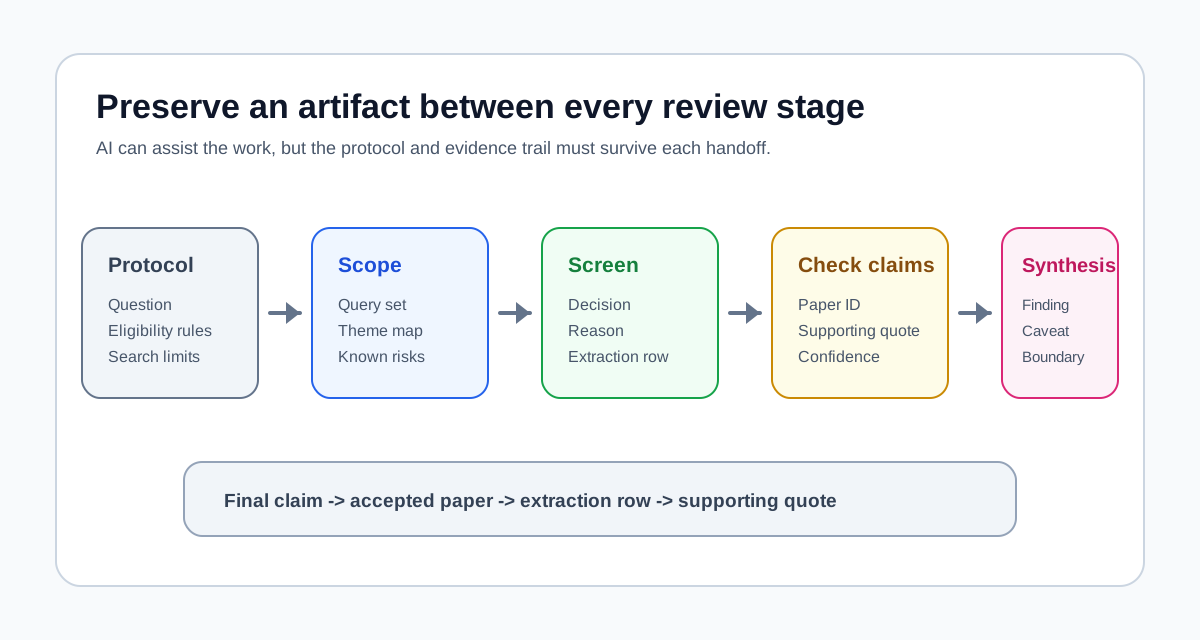
- 3Preserve a search trail, inclusion logic, extraction fields, and manual checks before writing conclusions.
The three-tool workflow at a glance
| Stage | Best tool | Use it for | Do not use it for |
|---|---|---|---|
| Scoping | Perplexity | Topic orientation, search terms, subtopic mapping, citation leads | Final paper selection or evidence grading |
| Screening and extraction | Elicit | Protocol setup, screening, extraction columns, supporting quotes | Unreviewed final conclusions |
| Claim checking | Consensus | Focused yes/no or directional evidence checks | A complete view of all literature on a topic |
Step 1: Write the review protocol before searching
Before opening any AI tool, write a short protocol. This is the part that keeps the workflow from turning into a pile of plausible summaries.
Minimum protocol fields:
- review question
- population, context, or domain
- intervention, exposure, tool, or phenomenon
- comparator or baseline, if relevant
- target outcomes
- accepted study types
- date range
- inclusion rules
- exclusion rules
- language limits
Example review question:
In higher-education settings, what evidence exists from 2019-2026 that AI-assisted feedback improves student writing outcomes compared with traditional instructor feedback?
At this point, you are not asking AI to answer the question. You are defining what would count as evidence.
Step 2: Use Perplexity for scoping, not final evidence
Perplexity is useful at the beginning because it can quickly surface terminology, adjacent concepts, and possible source trails. This is the stage where speed matters, but certainty does not.
Use Perplexity to collect:
- keyword variants and synonyms
- related constructs you may be missing
- common outcome measures
- recurring methods and study designs
- journals, conferences, and author clusters worth checking
- early disagreement signals
Good scoping prompts:
- "Map the main research terms used for [topic], including synonyms and adjacent constructs."
- "What outcomes do studies usually measure when evaluating [topic]?"
- "What are the strongest conflicting findings in this area, and which papers represent each side?"
- "Suggest search query variants for academic databases, including Boolean-style terms."
- "Which journals, conferences, or research groups frequently publish on this topic?"
The output from this step should be a search plan, not a conclusion. Save three artifacts:
query-set-v1theme-map-v1known-risks-v1
For more detail on where Perplexity fits, see Perplexity for Researchers: A Practical 2026 Guide.
Step 3: Move screening and extraction into Elicit
Elicit is the better fit once the work becomes structured. Its systematic review workflow supports protocol setup, paper gathering, screening, extraction, and report generation on eligible plans. That does not remove human review, but it gives the work a stronger audit trail than a general chat interface.
Suggested Elicit flow:
- Start from your protocol and review question.
- Run the query set you developed during scoping.
- Screen title and abstract results with explicit inclusion and exclusion reasons.
- Review AI screening suggestions instead of accepting them blindly.
- Define extraction columns on a small subset of papers.
- Run extraction only after the columns are clear.
- Check supporting quotes for important extracted answers.
- Export tables or citation files where your plan and table type support it.
Recommended extraction columns:
- citation
- study design
- sample or context
- intervention, exposure, or tool studied
- comparator or baseline
- outcome measure
- key finding
- limitation
- risk-of-bias note
- supporting quote
- reviewer confidence
Elicit's export options are not identical across products and plans. As of the latest Elicit help documentation I checked, Research Reports can export to PDF or Word, many tables can export to CSV or Excel, and some source tables can export RIS or BIB files; Systematic Review table exports are tied to Pro and higher plans. Treat export format as something to confirm before you design your whole workflow around it.
Step 4: Use Consensus for claim-level checks
Consensus is strongest when the question is narrow. It is not trying to be your whole review workspace. It is useful when you want a quick read on whether a specific claim appears supported, mixed, or weak across relevant papers.
Use Consensus for questions like:
- "Does intervention X improve outcome Y in population Z?"
- "Is the evidence mostly supportive, negative, mixed, or uncertain?"
- "Are there systematic reviews or randomized trials near this claim?"
- "Which papers appear to drive the apparent consensus?"
The quality rule is simple: use Consensus to flag where to look, then go back to the papers. Consensus itself notes that its meter reflects the most relevant papers returned for a specific query, not every study that exists on the topic.
For a narrower two-tool comparison, see Consensus vs Elicit: AI-Powered Research Search Compared.
Step 5: Build a traceability map before writing
Do not move from extraction straight into prose. First build a traceability map.
Use this pattern:
Claim A -> Study 3, Study 7, Study 11Claim B -> Study 2 and Study 9, mixed evidenceClaim C -> Study 5 only, low confidenceClaim D -> no direct evidence, remove or reframe
This protects the final article, report, or thesis chapter from sounding more certain than the evidence allows.
Your synthesis should make four things visible:
- what the evidence supports
- where the evidence conflicts
- which claims depend on weak or indirect evidence
- what should not be concluded from the current paper set
Copyable traceability register
Use one row per claim before drafting prose. This is intentionally smaller than a full extraction table; it connects the sentence you want to write to the review record that supports it.
| Claim ID | Draft claim | Accepted paper IDs | Extraction field | Supporting text checked? | Evidence direction | Confidence | Reviewer note |
|---|---|---|---|---|---|---|---|
| C-01 | Write the narrow claim here | P-03, P-07 | Primary outcome | Yes / No | Supports / Mixed / Does not support | High / Medium / Low | Population, method, or caveat |
Before a claim moves into the final synthesis, require four checks:
- At least one accepted paper is linked to the claim.
- The extraction row identifies the outcome or finding being used.
- A reviewer has opened the supporting passage in the paper.
- The wording does not claim more certainty than the included evidence supports.
If a Consensus result suggests a direction but none of the papers survives your Elicit screening criteria, record that as a scoping signal, not as review evidence. If Elicit extracts a finding but the supporting passage does not match, correct the extraction before drafting. The Elicit limitations and human-check checklist provides the deeper quality-control pass, while the Consensus citation verification workflow covers claim-level checking.
Step 6: Write the final synthesis with confidence boundaries
A useful final synthesis does not just summarize papers. It tells the reader what decision the evidence can support.
Use this reporting template:
| Section | What to include |
|---|---|
| Review question | One sentence with population, context, and outcome |
| Inclusion logic | The rules used to screen papers in or out |
| Evidence base | Number and type of included studies |
| Main findings | 3-5 findings with evidence strength |
| Contradictions | Where studies disagree and why that may happen |
| Caveats | Bias risks, data gaps, and external validity limits |
| Recommendation | What can be done, with confidence level |
Recommendation language should match the evidence:
- strong and consistent evidence: recommend with high confidence
- useful but mixed evidence: recommend conditionally
- sparse or indirect evidence: do not make a strong recommendation
- conflicting evidence: explain the boundary conditions instead of averaging the claims
Common failure modes
The most common failure is stage confusion. Each tool is useful, but each tool can damage the review if it is used at the wrong stage.
Watch for these mistakes:
- treating Perplexity's first answer as a complete literature map
- skipping written inclusion and exclusion criteria
- accepting Elicit screening or extraction outputs without spot checks
- using Consensus as if it has searched the complete universe of relevant studies
- writing confident recommendations from weak or indirect evidence
- failing to preserve enough detail for another reader to audit the workflow
Final recommendation
Use this workflow if you need a practical, AI-assisted systematic review process that remains auditable. Perplexity is the right first stop for orientation and vocabulary. Elicit is the strongest workspace for structured screening and extraction. Consensus is useful as a targeted claim-checking layer.
The workflow is not a shortcut around methodology. Its value is narrower and more realistic: it helps you move faster while keeping the review question, paper set, extraction logic, and final claims connected.
AI systematic review workflow: frequent questions
Short answers for execution details and quality control.
Sources checked
- Elicit: Why Elicit is different from other research tools
- Elicit: Export your data from Elicit
- Consensus: The Consensus Meter
- Perplexity: What is Pro Search?
- PRISMA 2020 statement
- Cochrane Handbook for Systematic Reviews of Interventions
Related reading
- AI Research Workflow in 2026: Which Tool for Which Stage
- Perplexity vs Elicit vs Consensus: AI Literature Search
- Perplexity for Researchers: A Practical 2026 Guide
- Perplexity Free vs Pro for Students and Researchers (2026)
- Consensus vs Elicit: AI-Powered Research Search Compared
- How to Use AI for Reading Research Papers
- Elicit Systematic Review Limitations: A Human-Check Checklist
- Consensus Citation Verification Workflow
Request the AI research workflow checklist
A practical checklist for choosing when to use NotebookLM, ChatGPT, Elicit, Consensus, Perplexity, Google Scholar, and Zotero.
No hype. Just workflow-first research tool decisions.