Perplexity vs Google Scholar for Research: When to Use Each
Compare Perplexity and Google Scholar for research. Use Perplexity for fast orientation and Google Scholar for papers, citations, and academic rigor.
AI search matters because many people no longer start research in a database or library tool. They start with a conversational interface that looks faster, easier, and more usable than traditional academic search. That is why Perplexity now shows up in real research workflows even when the final work still depends on academic sources.
The problem is that speed and usability are not the same thing as rigor. Perplexity is better at getting you moving. Google Scholar is still better at making sure you are standing on a more academically defensible foundation. If you treat them as interchangeable, your workflow gets weaker. If you assign them different jobs, they work well together.
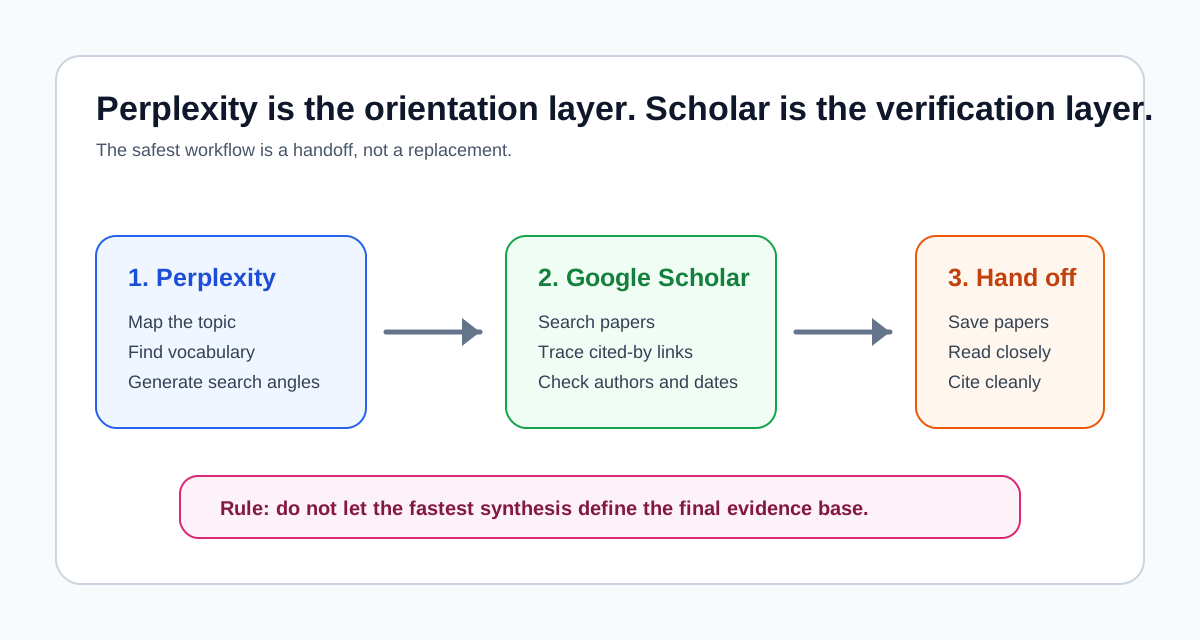
Perplexity is better for fast orientation and mixed-source exploration. Google Scholar is better for paper discovery, citation tracing, and academically defensible research. Use Perplexity first to map the topic, then use Google Scholar to verify the literature.
| Tool | Best for | Not for | Use with |
|---|---|---|---|
| Perplexity | Fast orientation, terminology, and mixed-source context | Final academic verification | Google Scholar or Elicit |
| Google Scholar | Paper discovery, citation trails, and academic retrieval | Quick synthesis or conversational framing | Perplexity for scoping |
In practice, I use Perplexity when the topic is still fuzzy and Scholar when the work starts needing a defensible paper trail. Perplexity can get you unstuck quickly, but Scholar is where I slow down, inspect papers, and verify that the literature actually supports the claims I want to make.
If you are building a full literature review, treat this as a handoff rather than a rivalry. Perplexity can help with discovery language and early framing. Google Scholar is better for academic verification. A source-grounded reading tool or reference manager should take over after the paper set is real. For a broader tool-by-stage map, use the AI Research Tool Selector or the AI research workflow guide.
How this comparison is evaluated
I am not evaluating Perplexity and Google Scholar as direct substitutes. They solve different jobs in the research process. The useful question is whether the task needs orientation, retrieval, verification, or citation-aware follow-up.
| Criterion | Why it matters | Stronger fit |
|---|---|---|
| Topic orientation | Can the tool help you understand an unfamiliar area quickly? | Perplexity |
| Academic retrieval | Can the tool find scholarly papers by title, author, keyword, and date? | Google Scholar |
| Citation tracing | Can the tool expose cited-by chains and related papers? | Google Scholar |
| Mixed-source briefing | Can the tool combine web, reports, and practical sources into a first pass? | Perplexity |
| Verification discipline | Does the workflow make it easy to inspect sources before trusting a claim? | Google Scholar |
| Literature review handoff | Does the tool help you move from scoping into a defensible paper set? | Google Scholar |
That evaluation frame is why the recommendation is staged rather than winner-take-all: use Perplexity to reduce ambiguity, then use Google Scholar to build and verify the academic source base.
Quick answer
- Use Perplexity when you need fast orientation, broad topic framing, quick synthesis, or a usable first pass across web and mixed sources.
- Use Google Scholar when you need paper discovery, citation chains, author and title search, alerts, and a more defensible academic search workflow.
- Perplexity is better for speed, usability, and early-stage exploration.
- Google Scholar is better for academic depth, citation tracing, and formal literature work.
- The strongest workflow is usually Perplexity first for orientation, Google Scholar next for paper discovery and verification.
| Research stage | Better first choice | Why |
|---|---|---|
| Discovery and scoping | Perplexity | It helps you learn terminology, debates, and possible search directions quickly. |
| Evidence pulse | Perplexity, then verify elsewhere | It can surface a first answer, but the claim still needs academic checking. |
| Academic verification | Google Scholar | It exposes papers, citation trails, author search, and related work. |
| Source reading | Neither as the main workspace | Move selected papers into a reading, annotation, or synthesis tool. |
| Synthesis and drafting | Perplexity only after verification | It can help shape prose, but it should not define the evidence base. |
Why this comparison matters now
Perplexity is increasingly attractive because it reduces the friction of starting. You can ask a direct question, get a synthesized answer, see cited sources, and move on quickly. That is a much easier entry point than typing a careful search query into Google Scholar and working through result lists, citation chains, and access links.
That is also why this comparison matters for more than curiosity. It shapes how people actually build research habits. A faster tool often becomes the default tool. The practical question is whether Perplexity is now good enough to replace a traditional academic search workflow.
My answer is no. It is good enough to improve the beginning of the workflow, but not strong enough to replace academic search discipline. If you are already mapping your stack more broadly, AI Research Workflow: Which Tool for Which Stage is the best companion page because it explains why search, synthesis, and drafting should not all be handled by one interface.
What Perplexity is
Perplexity is an AI search and answer engine built around conversational retrieval and synthesis. According to Perplexity's current help documentation, its search modes include Best, Pro Search, Reasoning Search, and Research. Perplexity Pro also gives users access to multiple advanced models, and the product supports file uploads, deeper research reports, and exportable outputs.
For research users, the important product idea is simple: Perplexity tries to collapse search and synthesis into one step.
That means it is useful for:
- getting oriented on an unfamiliar topic
- turning a broad question into a first-pass answer
- scanning mixed sources quickly
- producing a usable summary before you commit to deeper reading
That also creates its main limitation. Perplexity is optimized to answer. Academic research often requires you to inspect, trace, verify, and narrow before you trust the answer.
What Google Scholar is still best at
Google Scholar remains a traditional academic discovery tool rather than an answer engine. Google's official help pages still emphasize the core workflow features that matter most for research:
- keyword, title, and author search
- date filters and sort by date
- cited-by chains
- related articles
- alerts
- access links such as PDF, HTML, repository, and library links
- citation export formats such as BibTeX, EndNote, RefMan, and RefWorks
Scholar also reflects a very different product philosophy. It does not try to synthesize the literature for you. It helps you find scholarly material and navigate scholarly relationships between papers.
That is why it still matters. Research quality often depends less on how quickly you got an answer and more on whether you found the right paper cluster, followed the right citation trail, and understood what the literature actually contains.
Key Perplexity features that matter for research
The most useful way to think about Perplexity is not as a replacement for Scholar, but as a faster first layer.
Multi-model flexibility
Perplexity Pro currently offers access to multiple advanced models and lets users change models or use search modes optimized for different types of work. That makes it more flexible than a fixed search engine. If you want a quick answer, a more analytical pass, or a deeper report, Perplexity can shift modes much more easily than Google Scholar can shift behavior.
This matters when the task is exploratory rather than formal. You can move from:
- "What are the main debates in this topic?"
- to "Summarize the strongest arguments on both sides."
- to "Give me a clearer research framing."
without leaving the interface.
Synthesis-first interaction
Perplexity's Research mode is built to perform repeated searches, read many sources, and synthesize a report. That is useful when the work is not just retrieval but also compression.
This is a major usability advantage over Google Scholar. Scholar gives you the paper graph. Perplexity gives you a first-pass interpretation of what it found.
Better fit for mixed-source work
Research is not always journal papers alone. Knowledge workers and many students often need:
- papers
- reports
- policy documents
- market pages
- media coverage
- internal files
Perplexity handles that mixed-source reality more naturally than Google Scholar. That is one reason it has become more attractive outside formal academia. If your research work is partly academic and partly practical, Best AI Tools for Knowledge Workers gives a broader view of that mixed workflow.
How Perplexity works for research
Perplexity works best in research when you give it jobs that match its product strengths.
Where it works well
- topic orientation
- terminology mapping
- quick explanation of a field or method
- comparing broad positions before deeper verification
- generating a first-pass reading list
- summarizing a mixed set of web and uploaded sources
This makes it useful at the beginning of a workflow. You can use it to shrink ambiguity quickly.
Where it works less well
- formal literature review search
- precise citation tracing
- author-specific discovery
- reproducible academic search methods
- careful evaluation of coverage
This is where Google Scholar still wins more clearly. If your workflow is already source-grounded and you want to move into synthesis, that is where NotebookLM becomes more relevant than either search tool. The new NotebookLM April 2026 Update explains why the middle of the research workflow is now increasingly about sources, chat, and outputs rather than search alone.
A practical workflow example
Imagine you are starting a literature review on AI tools for academic writing. A weak workflow would be to ask Perplexity for the best papers, accept the answer, and start drafting. That is fast, but it gives too much control to the first synthesis you see.
A stronger workflow is:
- Ask Perplexity to map the topic, identify search terms, and explain the main sub-questions.
- Turn those terms into Google Scholar searches.
- Open the most relevant papers and inspect titles, abstracts, venues, dates, and cited-by chains.
- Save the defensible paper set into a reference manager such as Zotero.
- Use a source-grounded reading tool only after the paper set is deliberate.
In that sequence, Perplexity is not the authority. It is the orientation layer. Google Scholar is not the whole workflow either. It is the verification and retrieval layer. The quality comes from keeping those jobs separate.
For students, this usually means Perplexity is the place to become less confused before office hours or library search. For researchers, it is better as a scoping aide than a methods-layer tool. If the next step is comparing AI search products rather than Scholar, read Perplexity vs Elicit vs Consensus for academic research.
Comparison by decision point
The practical comparison is easiest when broken into the jobs a researcher actually has to do.
Speed
Perplexity wins clearly on speed.
You can type a full question, get a synthesized answer, inspect cited sources, and continue the conversation in one place. That is much faster than running a Scholar search, skimming result lists, opening papers, checking abstracts, and following citation trails manually.
If your goal is simply to understand a topic quickly, Perplexity is the better starting point.
Google Scholar is slower because it expects the user to do more of the synthesis work. That is not a design flaw. It is part of why Scholar remains more rigorous. The extra friction is often the cost of better research discipline.
Depth
Google Scholar wins on academic depth.
Scholar does not provide a polished answer, but it gives you access to a more research-native structure:
- cited-by chains
- related papers
- date filters
- author search
- title search
- library and repository access links
This matters because academic depth is not only about reading one result. It is about seeing how papers connect, what later work cited them, and how the field has evolved.
Perplexity can summarize what it finds, but it is not as strong at exposing the structure of academic literature itself. That makes it weaker for serious literature review work.
Accuracy
This is where the comparison becomes more nuanced.
Perplexity is not necessarily inaccurate in the sense of always being wrong. The deeper issue is that it optimizes for answer quality at the interface level, not for academic defensibility at the workflow level.
That creates several risks:
- over-trusting the synthesis
- missing relevant papers not surfaced in the first pass
- treating cited links as equivalent to a proper literature search
- confusing a useful summary with a complete view of the field
Google Scholar is weaker at explanation, but stronger at disciplined retrieval. That makes it easier to verify what you are seeing and harder to mistake convenience for rigor.
If the task is academically consequential, Scholar is still safer as the primary discovery layer.
Use cases
Perplexity is better for:
- fast topic exploration
- early-stage framing
- mixed-source briefing work
- practical knowledge work
- turning a vague question into a usable first search direction
Google Scholar is better for:
- finding papers
- tracing citations
- following a literature cluster
- building a formal reading list
- setting up alerts
- exporting citations into a reference workflow
If the research process continues into source-grounded analysis, How to Use NotebookLM for Research explains the next stage better than either search tool does.
A workflow view: the strongest way to use both
The most useful way to think about Perplexity vs Google Scholar is not as a winner-take-all choice. It is a workflow split.
Use Perplexity first when you need to:
- clarify the topic
- learn the terminology
- identify sub-questions
- get a rough map of the landscape
Then use Google Scholar to:
- find the actual papers
- trace cited-by relationships
- search by author and title
- build a more defensible literature set
Then move into a source-grounded tool such as NotebookLM if the next job is comparison and synthesis. That is why this comparison fits naturally with Best AI Research Assistant Tools: the strongest research stack often uses different tools for orientation, paper discovery, source analysis, and drafting.
When to use Perplexity
Use Perplexity when the bottleneck is speed.
That usually means:
- you are entering a topic quickly
- you need broad understanding before narrowing
- the work includes non-academic sources
- you need a usable summary now, not a formal literature search protocol
- you are a knowledge worker, student, or researcher in the exploratory stage
Perplexity is especially good when the task sounds like:
- "Give me the main debates in this field."
- "What terms should I search next?"
- "Summarize the current state of this topic."
- "What are the practical positions I should investigate further?"
In those situations, Perplexity is usually the better tool because it reduces friction without asking you to learn the literature structure first.
When not to use Perplexity
Do not use Perplexity as your only academic search workflow when the stakes are formal.
That includes:
- literature reviews
- systematic review prep
- citation-sensitive academic writing
- research tasks where coverage matters
- situations where you need to verify whether you have found the key papers
The problem is not that Perplexity is useless. The problem is that it is too easy to stop early. The interface makes "good enough" feel more complete than it often is.
That is the core trade-off. Perplexity helps you move faster, but it also makes it easier to think the search stage is done before it really is.
If your next decision is whether to move from Perplexity into an AI research search tool, see the comparison of Perplexity, Elicit, and Consensus for academic research.
When to use Google Scholar
Use Google Scholar when the bottleneck is rigor.
That usually means:
- you need academic papers, not just usable sources
- you need citation networks
- you need precise title or author search
- you need alerts for new work
- you need citation export and better reference control
Scholar is also better when you want the search process itself to remain inspectable. It gives you fewer shortcuts and more structure. For real research work, that is often a strength.
When not to use Google Scholar
Do not rely on Google Scholar alone when your problem is still vague and mixed-source.
Scholar is often a poor first step if:
- you do not yet know the terminology
- you need quick orientation across web and academic material
- the task is practical rather than formal
- you need a synthesis, not just a result list
In those cases, Scholar can feel slow and cumbersome. That friction is exactly why many people reach for Perplexity first.
Best for whom
Students
Students should usually use Perplexity for early-stage understanding and Google Scholar once an assignment starts depending on actual papers. Perplexity is better for reducing confusion. Scholar is better for making the reading list more defensible.
Researchers
Researchers should treat Perplexity as an orientation tool, not a replacement for literature search. Google Scholar remains the better default for paper discovery, citation tracing, and formal academic retrieval.
Knowledge workers
Knowledge workers often benefit more from Perplexity because their source base is usually mixed and practical. If the work includes reports, media, policy documents, internal material, and only some academic sources, Perplexity is often the more natural first tool.
Final recommendation
Perplexity is faster, easier to use, and better for early-stage exploration. Google Scholar is slower, more limited at the interface level, and still more reliable for academic rigor.
That means the verdict is clear:
- choose Perplexity when you need speed, framing, and usable first-pass synthesis
- choose Google Scholar when you need defensible paper discovery and citation-aware research
- use both when the workflow starts broad and then narrows into formal literature work
The key mistake is asking whether AI search is good enough for all research. It is good enough for some stages of research. It is not yet a replacement for traditional academic search discipline.
If the job is academic retrieval, Google Scholar still wins. If the job is fast orientation and practical synthesis, Perplexity wins. Most serious research workflows should keep both roles separate.
Common questions
The practical answer depends on whether you need fast orientation or a defensible academic paper trail.
Open the AI Research Tool Selector
A simple decision matrix for choosing NotebookLM, Elicit, Consensus, Perplexity, ChatGPT, Google Scholar, and Zotero.
Open the AI Research Tool SelectorRelated reading
- NotebookLM April 2026 Update: A Better Research Workflow for Real Use
- How to Use NotebookLM for Research
- AI Research Workflow: Which Tool for Which Stage
- AI Research Tool Selector
- Perplexity vs Elicit vs Consensus for Academic Research
- Best AI Literature Review Tools
- Best AI Research Assistant Tools
- Best AI Tools for Knowledge Workers